Now you can use your Android as remote control of your
PC. You just need you Android phone & a Bluetooth device. So let’s start
the work!
At first download the server from this link. To use this
software you will need to have .NET framework4 in your PC. If you don’t, then
download that from here. now download
the app “unified remote” to your phone from android market. Or, scan the
following picture by “Barcode scanner” of your phone install the app. Now install the app to your
PC. Make pair with your phone from your
PC. Now open “unified remote” server on
PC. Activate “unified remote” on your
mobile. Click on server to select your
PC. Now control your PC choosing any of remote from remote option.
Advantages of Unified Remote
Bluetooth Mouse
Bluetooth keyboard
File Manager
VLC controller
Power controller
Firefox controller, etc.
If you get disconnected any
time then add the server again to reconnect it.
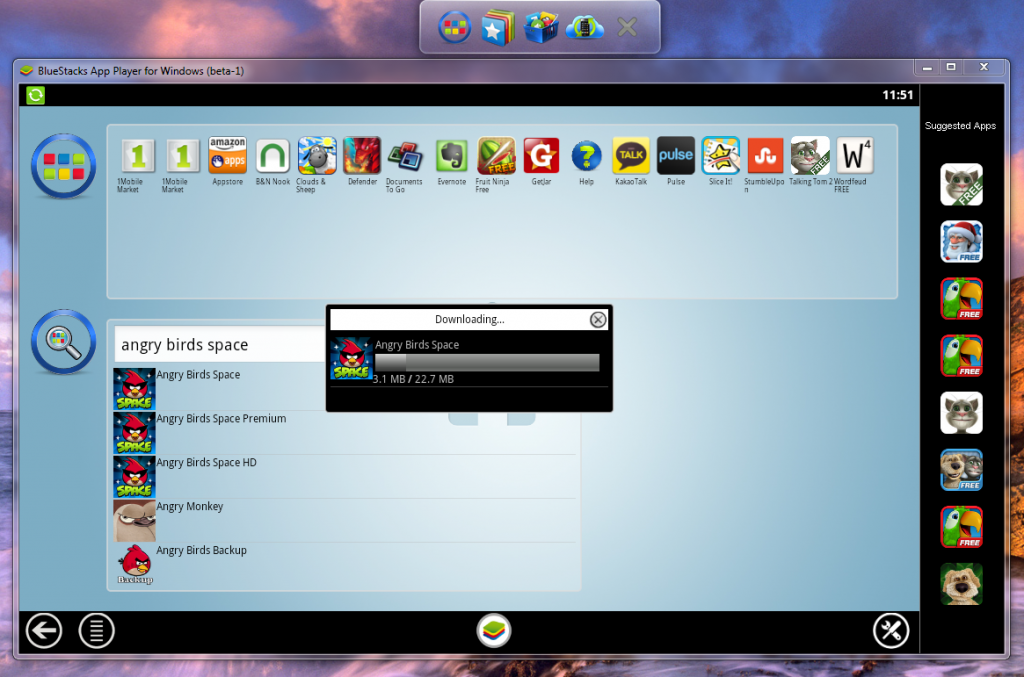
Install it with the help of internet. If you want then you can
maintain an account in bluestacks.
From here, you can install any games, apps, etc as your choice.
If you want, you can keep it by uninstalling. So from now, you can
download all games and apps of android mobile into your PC. And transfer it to
your mobile, by selecting the option cloud
Connect.
You can understand the procedures from the following images-
The animated series, ‘Angry birds’ has become one of the
main targets to the counterfeit app makers. From an article of
nakedsecurity.sophos.com, we got to know that some unexpected things are moving
round the version of ‘Angry birds space’.
So angry birds lovers should be aware to download the new
version of this game. Especially if you are using android phone, then your
android phone is now under the control of hackers. Don’t get fooled by the
fake!!!
Hey friends….. Now you can play the most popular game of
facebook ‘zynga poker’ on yourmobile, as well as your PC!! However, your phone
must be android. The most attention-grabbing side of this game is the ‘chips’.
Almost everybody come to a competition of having the maximum chips. For playing
this game, you have to download it.
Instagram is one of the popular apps of I-phone, I-pad &
I-pod touch for capturing & sharing photos. It is now arriving on Android
too. Registration has also started on their site for Android users- news of The Next Web.
Android users will be able to use this app by using their E-mail
address before instagram will arrive at Google play, Amazon store & other
apps store – said The Next Web. It has already won the heart of 27 million owners
of IOS devices. But the authority has declared this Android version of instagram
will be more developed & characterized.
Instagram is a popular app of capturing & sharing photo
of Apple I-phone. When Android users heard the launch of Instagram on Android, they
were just counting the days. At last it has released on Google play formally. But
many users did not find it on that day!! This news is collected from The Next Web.
We know, to download any app of Android operating system of
Google it needs to go to Android market, recently what is named Google play.
Next Web said persons who searched for Instagram on Google play continuously 5hours
after launching it; they got other apps like Instagram in the beginning. That
means, though there should be “Instagram official app” on the top of the result
page, Google took 5 hours to update it.
As a result, many users have downloaded different apps what
have similar name with Instagram but only purpose of those is being downloaded
more. This problem has been seen on Google play from both Android device &
computer browser.
But after that Instagram has been placed on the top of that
result page- said The Next Web.


 Advantages of Unified Remote