Showing posts with label facebook. Show all posts

Complete facebook: A wordpress plugin


Now you can enable facebook like, comment for each post of your blog. Sometimes people need to get registered on the site in which they want to comment on any blog. But it seems difficult to comment by registering on any site. I will give you a plugin. With this plugin you can enable like, share for a specific post or for all post or blogs.

How to download

  •       At first, you have to go to the following site.


               http://www.wordpress.org/
  • Then you will see a page like the following figure
  • On the top of the page, you will see a heading WoRDPRESS.ORG. Beside this, you will see some menu. From these, you have to click on the menu plugins. Then a window will start to load like the following figure.
  • From the window, you have to search your required plugin. You will see a search box above Featured Plugins. You have to type Complete Facebook on that box and search. See the search result like the following figre.
  •  You will see many results related with complete facebook. You have to choose the first one. Click on that, and see like the following figure.

  • For your convenience, the download option is marked with red color. Click on that.
  • If you want to know anything about installation this plugin, then click on the red marked install option.
  • If you want to know the plugin feature, then you will see some red marked features on the bottom of the page.

How to upload:

  • At first, login to your blog > dashboard. From that, you will see an option named plugins. Point the mouse on that. You will see some sub-options. Like, Installed Plugins, get one more etc. click on get one more. Then a new window will start to load like the following figure.
  • Click on the red marked box of the above image. So that, you will go to the uploading page. Click on that, you will see like the following figure.

  • Click on the browse button and show the downloaded file. then click on the button which is beside the browse button.
Wait for a while, for installing the plugin. No more today, have a good day friends…..!
Photo source: http://www.pchelplinebd.com/

How to share any facebook picture or post through mobile


Hello friends..many of us use facebook through mobile. But the problem arises when we want to share any post or pictures. Here I have a solution for this problem. Go to this link first.
www.facebook.com/home.php  to get the facebook on PC mode. Now share the post or picture you want and go to normal mode after done that.

How to recover hacked facebook account


Hacking facebook ID is a common phenomenon these days. Anyone can become a victim of it through any scheme or apps. Or, for having weak password. & if the hacker changes your password too after hacking. Is there really any way to recover that ID? Yess, here I am sharing some ways.

Recovery of hacked ID:

Step- 1: Enter to www.Facebook.com/hacked from address bar. 
Step- 2: Click on My Account Is Compromised.


Step- 3: There will be three options to identify your ID from Identify Your Account.

  • Email or phone number, 
  • Facebook username 
  • Email or phone number.

Provide required information in any one of these three & click on search button.


Step- 4: Enter captcha letters in Security Check option.
step-5: There will be your account with username & picture, click on This Is My Account.


step- 6: Enter the password you used.
step- 7: If facebook got all your provided information correct then it will provide you next steps. Go properly forward, hope these steps will help to get your ID back!

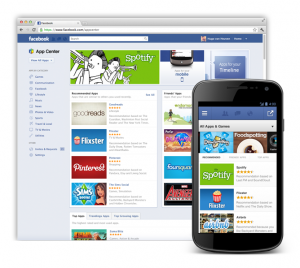
Facebook launched it's new app centre


Facebook has launched app centre to provide software service to its users. Apple and Android operated Smartphone and tablet users will get more benefits from it. This service will be available within a few weeks said Facebook. That’s how software developers will get a chance to sell different app directly to Facebook users. This system is offering paid application for the first time in this social networking site.
To purchase or use any application from here it needs Facebook credit. However, there will be many free applications too. Authority expects to have more users with the availability of this app centre. Because it will fulfill various demands of facebook users.
  Mashable said the search box that is used to find friend, page or group same box is also used to search different applications. But soon Facebook will have a separate app Center like Apple’s app store or Android’s Google play. This will help to search each application separately. 
But Facebook said facebook app centre will work differently from other app store. Because most applications have already works in IOS or other third party sites or devices like Android. Those apps just have been connected with facebook as if the facebook users can get the services through their facebook account. That’s why in most cases when users will download any app from facebook app centre he will be forwarding to the app centre of that device.

Women or men? Who are more addicted to facebook?


Facebook addiction is increasing in young generation. And girls are one step ahead on this matter-Known from British daily Guardian.
It is known from a research that took place among 423 students of Norwegian University of Bergen. The research was to observe facebook users behavior. The students were divided into six categories. Like, those who use Facebook much less time and those who used to always log on to facebook. In these way users psychological behavior is categorized. And it is seen that girls are more into facebook than boys. Scientists also said the students who are addicted to facebook their behavior are similar with alcoholic.
They said, this addiction is seen in young generation more than adults. Especially who spends more leisure times. And the level of their addictive behaviors is increasing with their increasing level of addiction. In addition, they also mentioned that women are at more risk of this addiction than boys.
People who feels socially insecure and suffer from mental stress their level of dependency on Facebook is more than others. Facebook is popular as a means of communication to them.
Moreover, psychologists said, people who are workaholic and busy have low level of affection on facebook and at lower risk of addiction.
Furthermore facebook has been also blamed for the increasing rate of divorce in USA. It is seen that in each three separation of USA, facebook is directly involved at least one of them.

Fake ID: recognize it easily


Facebbook has become very popular among people in recent time. And by using this popularity many people is opening fake accounts in facebook. From a statistical analysis, we got to know that almost 40% new facebook ID is fake.

 
Reasons for opening fake account:
  • Only for making fun
  • For making spam.
  • For hacking other accounts.
  • Ways to recognize fake ID
  • If you see that, any celebrity has sent you friend request.
  • If you there is no picture updating on the profile.
  •  If you see that, the ID is new but numbers of friends are more than 4000!
  • Sometimes the birth date may be begin as the following format 01-01 or 01-12
  • The privacy setting may be open for all.
  •  The information may be given as slipshod.
  • Sometimes it sends links of unrecognized sites and requests to join with that. 
  It never updates any status.

Secure your facebook ID


In recent times, hacking has become a popular issue. Many of us face embarrassing situation infront of our friends for the hacking of our facebook ID. If our ID is secured, then it can’t be hacked. There are several ways to check the security of facebook ID.

At first go to facebook and then go to the following link, www.facebook.com/update_security_info.php?wizard=1&src=netego.
It will show you ‘strongwritten by green color if you are secured, and if not then you will see ‘low’ written by red color. In this situation, you will be given three options to improve your security.
  •   At first, you have to add more than one email address.
  • Then you have to add your cell phone number in your account.
  • At last, you have to add a security question.
If you fulfill these requirements, then it will be possible to regain your lost account. Moreover, on the upper right side of your account page you will find the option ‘Account/Account Settings/ Account Security’ go to there and click on the check boxes of the ‘change’ option. After this, when you login your account, you see a page ‘name new computer’. You have to give a computer name and continue. Now when you login to your ID, a message will be sent to your cell phone informing the name of computer which were used in the last login. If the name doesn’t match with you, then change your password immediately.
 
You can look-over some more facts for your security. Such as-
  • If you are invited to click any doubtful link, so don’t click on that.
  •  Do not add any distrustful applications on your ID.
If you already have add such type of application, then go to this option- account/privacy settings/edit your settings (application and website) from here you can see the unnecessary applications. And to remove it, click on the remove option of ‘app you use’ tab.


New service of facebook


Recently Facebook has started a new service. This is called ‘Offer’. Now users can see various offers of companies on their news feed. For example if any user likes the page of a restaurant, then the new offers of that restaurants will be appear on his news feed. He will have to click on the button ‘Get offer’.


From marketingland.com, we got to know that, if any person claims offer. Then Facebook will send an email on his mail address on behalf of the serving company. The claimer only has to show the copy of the email to the concerned place, and then he will get the offer.


Apply some tricks on your facebook Timeline


Facebook has upgraded their profile page with a new outlook. I think all of you already known with that look. Yessss…I am talking about timeline. Timeline is a repository for your personal information. It looks like a scrap book of the user & it’s more eye-catching than previous look. So it’s becoming more & more popular day by day.

Mark Juckerberg has launched “ Facebook timeline”  last year at San Francisco, USA. After experimenting for several days it has been opened for all. According to Facebook blog people who haven’t activate timeline yet on their profile will get it soon automatically. Though this new outlook seems complex to many & they can’t understand what to do with it. Here we are for you guys.

At first let’s talk about some features of timeline.


7days for review:
 If you upgrade your profile to timeline you will have 7 days more for to publish it. This time is given to make your timeline an attractive one. But you can publish it anytime you wish. Or if you want to wait then it will be published automatically after 7 days.


An attractive cover photo does magic for you:
At Facebook Timeline feature, the cover photo is something new. It is most attractive feature of timeline. Though profile picture is used everywhere but as cover photo is large in size and placed at the top of the timeline, so an attractive cover photo can reach you a different level to your friends. 

No new information is shared:
Timeline isn’t adding new information if you haven’t add any. It is just presenting your previous information with a new look.


Your privacy setting will be same:
You need not set your privacy for timeline again. Your previous privacy setting will exist there too. So, nothing to worry about your privacy,man!!


Important posts will be highlighted in large view:
Timeline will highlight your most attractive & important posts with large view. It will be determined on the basis of like & comments.

Best way of editing timeline:
Facebook has opened a helping page named activity log. You can go there from your timeline. You can check here all of your posts, likes etc. If you don’t want anything showing on your timeline just remove that from here.

Only for you:
If you want any post showing on your timeline can’t see anybody but you. Set “only me” option on that post.


Users can add important events:
There is an advantage to select date at the time of posting anything. So, if you upload any picture of previous days you can add date of that time.  And that will be added on your timeline along with that date.

It’s time to be updated:
Facebook timeline will be activated for all either you want it or not. So, better activate it now and decide how you will present it to your friends, colleagues and friends.

So what are you waiting for?  


Hack facebook id easily


Are you searching for any software to hack facebook ID? If your answer is yes then this post is only for you!! There are many facebook hacking software on internet. May be you have seen many of this.Where following kind of instruction is given usually:
  • Download the software & install it in your computer.

  • Enter your e-mail ID & password.

  • Enter your victim’s e-mail ID.
That’s it!! You will get your desired password.
 Here, I want to ask you a question. Do you really think you will be able to hack any ID in this way? Lolzz.. You know what?  Have you realized you are already trapped in?  Don’t think like a child. Think as a hacker then you will gotta understand it.
Now, come to the point. What this “hacking software” really is? 


Well, actually there is no software in the world what can help you in hacking only with entering an email ID there. So what you have seen is fake & only fake. These software are made for newbs (new hacker). Hackers upload this software in different sites so that newbs get trapped in. When you install this software in your pc, there will be automatically installed Trojan horse, spyware or key logger that will leak all of your information to the hacker or will destruct your pc. So if you really want hack any facebook ID then you can follow these ways what can actually help you.
  • Phising method.
  • Software key-logger. 
  • Hardware key logger.

  • Using fireship.

  • By stealing cookie.

  • With the help of social engineering.

  • By hacking e-mail ID (by attacking brute force or dictionary).
Will you use those hacking software anymore? Well,It’s completely your wish.


Comment on facebook by opera withouht any loading issue


When we comment on face book using opera mini then it has to load that page again. And for this reason many of us use UC browser instead of Opera mini. But there is a solution even in Opera mini. I am letting you know that solution now. Here I am using Opera mini 6.5
  •   At first go to address bar & type- opera:config  or  config: then click ok
  •    Then following page will appear.


  • There will be an option named “site patches and user agent masking” below the page. Click-No.
  • At last go below of that page & click save.
That’s it. Your work is done. Now access your face book more easily & comment without loading the page again.  

From the beginning till now of facebook


Now-a-days facebook has become a part & parcel of our life. If you ask even a school boy about his activity on internet he will answer you with spending time on facebook. We spend several hours a day on face book. But do we know its beginning? We all know of Mark Zuckerberg founded it. He launched it in February, 2004. But do we know the name of facebook at that time? Or, how it looked like at the very beginning?
Let’s recall those days.....

facebook on 2004


facebook on 2005


year of 2006


Year of 2007 & 2008 though we are familiar with this look.


On 2010 with a huge change


 On 2011 and many people still using it


At last timeline came
This is our facebook! It was named as thefacebook.com at the beginning. Later “the” has  removed.

How to disable facebook timeline


Many people are not satisfied about the timeline. They want to remove timeline from their facebook account. Here is a trick to remove the timeline so easily, without facing any problem! For this, you have to download an ad-on named ‘Timeline Remove’. You can operate this on the new versions of Mozilla firefox, internet explorer, and Google chrome. 
  • At first, you have to download the software. 
  • Then according to your browser, install the ad on. 
Download:  Download :  Download:  
  • After that, restart your browser. 
  • Moreover, you will see your timeline no more! 

One thing you should know about this ad-on, after installing this you won’t see others timeline too!!


Download facebook photo album with one click


Now download your facebook photo album in a very easy way! We have many photo albums in our facebook account. However, when we want to download those photos, it is quite hard for us to download the whole album. Nevertheless, this work can be done more easily. For this, you have to download a program ‘Add-ons’. Go to the following link-


Download the program; install it on your PC. Then go to your facebook account. You can now download the album by clicking the option ‘Download album with facePAD’

Make your facebook status or comment blue!!


Today we are going to share a new trick with you. How to make your facebook status or comment blue!!It is very simple. Just follow this way:


Type following line & Post as your status or comment:
@@[1:[0:1: here type your post]]

Now see…your post became blue!!This is applicable for mobile also.

Facebook counter suing yahoo


Yahoo recently sued facebook with the claim that the social network has infringed 10 of its patents including systems and methods for advertising on the web. Now facebook counter attack yahoo with lawsuit.


Now Facebook is counter suing, claiming the web portal violated its patents covering photo tagging, advertising and online recommendations. But yahoo denied this suing.


Yahoo claims Facebook's suit is "without merit".
Facebook recently acquired 750 patents from computing giant IBM.
Until the end of 2011, Facebook held just 56 patents, a figure analysts say is comparatively low for a technology company. By comparison, Yahoo owns about 1,000 patents. - News from BBC. To read more visit here


How to select all friends in facebook with one click


Everything in facebook is now with new timeline. Now the original referenced select all scripts no longer working in our browser. All of the previous scripts are dead for fan page now. But so what? Google chrome supplemented a new way to select all friends in facebook with one click. The invitation system in facebook is rather boring to me. You have to select every friends manually. For those who have more than 1000 friends its very much difficult for him. Here is a tricks to solve of this problem. So now you don't need to copy/paste Javascript code into the web browsers, just you've to install the extension on your Google chrome browser then a "Select All" button will always become visible in the facebook invitations windows.


Lets See How To Add Facebook Select All Extension In Google Chrome :

  • Open your Google Chrome browser, Now go to this link for downloading chrome extension.


  •  After enter chrome extension site, look at the top left side search box & type there Auto Select All Facebook Friends and press "Enter" keyboard button.
  • Wait few seconds. You will see so many extension in there. You've to select  "Auto Select All Facebook Friends"  extension from them & click on the "+ Add To Chrome"
  • Now Confirm this extension, just click on "Add" button.


  • Now go to your facebook fan page and click on Invite friends
  • When the invitation window come up, click on Recent Interaction then select Search All friends
  • Now your facebook friend-list all friends viewing in this window for select.


  • Just click on the "Select All" button and see the magic ( This may take awhile to run depending on how many FB friends you have. It can take up to 10 minutes for users with 5,000 Facebook friends )
  • After auto select all, Press "Submit" button


Done ! You'll get an invitation sent pop-up confirmation message.


How to select all your facebook friends in one click to invite friends.


The invitation system in facebook is rather boring to me. You have to select every friends manually. For those who have more than 1000 friends its very much difficult for him. Here is a tricks to solve of this problem. It will work 100% for your facebook event invitation only.. But keep in mind that dont use this tricks simultaneously at a time. In that case facebook will track you. With facebook new style of 2012 it will work. Its tested on march 31 , 2012. So don't worry.It will work for you .


How to select all your friends at once:


1) Use Firefox latest version / version 6.

2) Open your facebook fan page.

3) Click on “Invite friends”.

4) The grid of friends is opened.

5) Select “Search all friends” and scroll down, so all your friends are loaded.

6) Press Ctrl+Shift+K.


7) A firefox panel is opened on the top of the page, here you can put the javascript code (put the two lines in a single line):

elms=document.getElementById('pop_content').getElementsByTagName('li');for(var fid in elms){if(typeof elms[fid] === 'object'){elms[fid].click();}}

This code will select each friend and perform a click on it.

8) Press “enter”.

9) Wait the selecetion (it could take some minute).

10) Press “submit”.


You are done. It will take some times by facebook to deliver all your invitations, actually it depends on your friends amount. Best idea is that wait about 2 hours and then check again whether the requests has sent or not by facebook. If you find friend requests did not send then again apply the above tricks.

Increase the fan of your facebook fan page


Today I will discuss an effective way of increasing fan in the face book fan page.
Firstly you have to register yourself in the website, (youlike hits ). As you get registered, you will get bonus 50points. The main advantage of this site is, you can get 50points by login everyday and by clicking the button, ‘Claim 50 Free Points Daily!’ moreover you can gain points by liking others face book pages, following twitter, subscribe to ‘you tube’, and also visiting in other websites. You can gain 100points also by doing referral.
Now let’s talk about the use of those points which you gain. You have to give your face book address by clicking on the FB button which is located below ‘your settings’, on the left side of the website. Next you have to add the fan page of which fan is needed to be increased. You can add your fan page from Add aPage which is located below the website. Here you have to fix on point for every like.
By this way you will be able to develop the number of fans of your fan page.

Your Facebook Pictures more artistic more special


Now-a-days facebook is widely used to share pictures with friends, family and others. This topic is about facebook application to make your pictures even more special, artistic and different.
An application that beautifully presents the pictures that is just what we want. This is called Loupe.

LOUPE will shape your pictures like anything you want.Like,your pictures will be shaped as a butterfly or a penguine. Isn’t it stunning!!
To use this application , at firtst click Get Started button.
To find pictures click on New button.
To use your facebook pictures click on Connect With Facebook ,or you can use web service as TWITTER or TUMBLR.
If you want to select picture from from facebook account, then select from DROP-DOWN menu – from where you want to pick picture : like, your profile or your friend’s album.....
After selecting one , click on Done
To add more photos click on +Photos
After selecting pictures, choose the shape you want to.
Click on Share button when it is done. You can share it on your wall, can save it as an album or can share it in any website by copying the address.
It is great and sometimes funny experience to present the pictures in various shapes by Loupe . Just try it...believe me , you won’t be disappointed!!