Home » Posts filed under how to
- At first go “run” from start menu.
- Type regedit & press enter.
- Double click on Hkey_Current_User
- Double click on Control panel.
- Double click on Desktop.
- Now double click on auto end task from right side.
- Put the value data 1 instead of 0 and click on OK. Now restart
your computer.
Now, your Pc won’t
hang ever...Stay cool!!
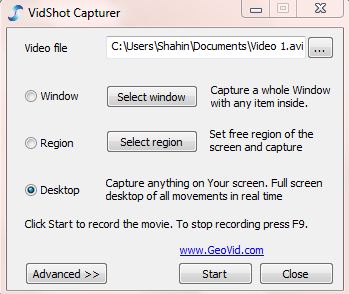
Now it became very easy taking screen shot of desktop,
windows or any custom area snapshot with a small software named VidShot capturer.
It’s also very easy to use.
1st
step:
At first open the
VidShot capturer.
2nd
step:
Now select the
file name and the folder where you are going to save it.
3rd
step:
Here you will get
three options for capturing video. Select region to capture anything from your
selected area. Now click on Start button.
4th step:
Press F9 to cancel the capture or make double click on video
soft icon on Taskbar.
Press “yes if you
want to make a preview of your caption.
Want to delete all virus of your computer permanently? Here is
a simple trick to delete all types of autorun.inf, autorun.ini, desktop.ini,
new folder.exe viruses from your Pc. And it takes only 1 KB. So, let’s do it!
At first go to Start menu>accessories> open notepad. Copy
the following codes and paste on the Notepad. Save it as SR.BAT
Now it only needs a double click and see what happens!
How to create a Payza account:
- At first click here to Sign-up.
- Click on Sign-up now.
Step-1:
Fill up the form properly. Provide the information as given
on your national ID card. And then click on Next Step at the bottom of the form.
Step-2:
Select the
options- Email address, Password, Transaction Pin and Security Question .Answer
them correctly. Now click on-final step.
Step-3:
Log-in to your E-mail to make this account valid.
How to verify your Payza account:
There are two ways
to verify your account.
- Document validation process.
- Photo ID validation process.
I am going to describe here both the process and what you
are going to need for completing each process.
Document validation process:
Needed documents:
- A scan copy of your national ID card or passport or driving license.
- You monthly bank
statement.
Process:
- Log-in to your Payza account.
- Click on "Verification" on the right top of the page.
- Select- "Document validation".
- Click on "Choose file". Select the documents (scan copies)
mentioned above.

- There is a Bank Document option right below. Put a tick mark
on "Bank statement" underneath of "Bank document" option. Select your account statement
(scan copy).
- Are you done? You can
make a preview at your provided documents as a final touch. Then click on "send" button to send your request.
Photo ID validation process:
Needed documents:
- Your national ID card along with your passport or driving
license. In this process you won’t need to provide your bank account statement.
Process:
- Go to verification.
- Select- "Photo ID validation".
- Select your
National ID, passport or driving license copy(scan copy) from photo ID.
- Press on "Next".
- Make a preview at
your documents.
- Finally click on "send" button to send your request.
You will get their
reply within 2-3 days. There is no reason not to approve you if your provided
documents reached them properly. But if they don’t accept your request, they
will specify you the reason.
Hey friends...How are you all? Again we come with a new tricks of hacking Banglalion/Qubee as we got a lot of response from you guys for this
stuff. Here is the whole process for you.
- At first, open an account on following site.
-->
- Now go to your E-mail to verify this ID.
- Then, download
a software from here-
- Open it by winrar
or 7zip. You will find a drive there. If you use 32-Bit OS, open the file-x86. Or,
if you have 64-Bit OS, then open the file-x64.
- Wait for a while. Following
window will appear there.
- Click on any key.
- Now open the software I provided. A pop-up window will
appear like following one.
- At this stage, connect
your modem. Open PD-launcher and provide your username and password. Click on
connect. It will take maximum one minute. We are done!
Now use internet
for free! You will be able to use 100MB by one ID. So open a number of ID as
much as you want. But for using various ID, never finish 100MB completely from
any ID. So whenever you are about to finish the MB by one ID, connect with
another one. By this way, you can browse, download and whatever you wish! Take care!
Photo source: www.techtunes.com.bd
Have you ever faced any problem to attach a large file with
an E-mail? Here is the solution for this problem! You can use “Winmend file
splitter”
Try it by yourself and
suggest your friends too!
- At first determine the file which you want
to split over, select button source file. Later it needs to select an output
folder.
- You can increase the block numbers freely. After
that, only click on split button.
- Later go to Out folder to attach the split files with the
E-mail.
Guyzz how are you all? Now a day’s social networking has become
the part of our life. So everyone has minimum one facebook account. Even many
has facebook fan page. As the visitors and likes increase on the fan page, the
popularity increases. Today I am giving you a site, which will help you to
increase likes on your facebook fanpage. Not only facebook fanpage, you can
increase the visitors and likes of twitter, Google plus or any blog site.
Open an account in the following site-
You have to like others fan page by this account. So that, you
will get coins. With these coins, you can increase the visitors of your
fanpage. Moreover, by selling these coins you can get money via Bkash. As many coins you will collect,
your level will increase proportionately. So you can get more work to do. You
can withdraw money through Alertpay,paypal
besides Bkash. For withdrawing
money, go to Point to Cash and send request for money. Payment is made on
Friday. I hope, you can get more by working there for some days. No more today.
Give us your opinion.
Have a happy day!
Teletalk has declared the launching of 3G connection in
Bangladesh. Primarily this service is for Dhaka, tongi, gajipur, narayanganj
and savar. Moreover, chittagang, shylet and coxes bazar city is also in this
service. Teletalk has declared to join the gravity
club. So that, the present users of this sim will get 3G (third generation)
sim earlier than others.
What is
gravity club:
Gravity Club is virtual group where any prepaid subscriber will
register via SMS and will have to follow the guidelines for claiming the 3G
connectivity free.
How to
join in the gravity club:
- Each prepaid sim holder will be able to join
this club. Interested consumer has to recharge the account with minimum tk 500.
Then you have to go to the message option of your mobile, type Gravity and send to 666. (no charge will be needed)
- After that, tk 500 will be cut from your
balance and you will be the member of gravity club for next 1 month.
- You have to recharge tk 500 again before the
expiration of 1 month. Then go to message option, type Con and send it to 666.
You are done for next one month again.
- You have to ensure your mobile balance tk 500
for each month upto next two months. Otherwise, your registration will be
cancelled.
Summary of
Gravity Club’s Offer:
Hot deals: The
lowest tariff (Onnet – 47/min and Offnet – 87/min) applied in bundling offer.
Beside 1 second pulse is applicable.
Price: 500 BDT
including VAT
Total
Talk-time: 600 minute (On net 300 min and off-net 300 min)
Total SMS: 200 (On
net: 100, off net- 100)
GPRS: 50 MB
Bonus
offer:
- After the expiration of this gravity club
offer, every member of this club will get 3G connection free.
- Moreover, each member of this club will get
1GB internet free.
So friends….. Let us know, whether this information helped you or
not. You can get the bundle offer by re activating your blocked sim.
In recent times, many internet users are facing DNS server issues.
They are facing problems to access internet. But friends…. I have a solution
for this! Do you use broadband connection? Then now you can hack your
connection and make your connection speedy. However, you should also know this;
if you hack the broadband then the service provider will face many losses.
So friends….. Let us start broadband hacking!!
At first, you have to download the software named Advance IP
Scanner. Download it from below.
Now follow the rules given below-
- Open the software and click on IP, then press scan. Look at the following image.
- Look at the following image. Right click on
any PC and check in which PC the FTP is Connected. Copy the mac address of that PC. So that, you
will get more speed.
- Then go to your LAN (local area network) and choose Internet Protocol version 4 like the following figure. Click on Configure.
- After that, choose - Advance>Network address> Value and paste the mac address.
- Press ok and close the window. Go to advance IP scanner again and write down the IP address from the same PC, from which
PC you copied the mac address.
- Now go to the LAN again. From there, go to the properties of Internet Protocol
version 4 and set the IP address that you saved recently. Keep your previous IP
address safe. Because, you will need it when you will make your PC like before.
How to get back the previous settings-
- Go to LAN.
Then select Internet Protocol version 4.
Then select Configure> advance>
network address> Not present and press ok.
- Go to your LAN again. Then go to the properties of Internet Protocol version 4 set your previous IP. Close the window.
Be aware:
The internet service provider may check your connection. So you
have to be so careful. I can give you a tip on that. Change the name of your PC
and give it untitled or something else. In this situation, the service provider
cannot find your PC.
Today I came here with a super hack tricks of Banglalion. Try
this thing for unlimited free downloading. But sadly, there is no scope for
free browsing. It will rather consume your bandwidth. So, let’s start it!
- Open your IDM and click on Options from Downloads.
- Now click on Site logins.
- Click on New to open a tab> Select https> type *.162.175.135.001
on Server/Path. Give username- user@cms.banglalion.com.bd
and enter your password on password box.
- Now connect to your internet. Download the SMAC software
from here
and install it. There may show an error report while installing. Don’t
be bothered with that just complete the installation process by following the
instructions there.
- Now disconnect your internet but keep plugged in your modem.
Open the software you have installed right now. A tab will come there. Click on
Active Mac.
- Now press on random.
- Press- Update Mac.
Now connect your
internet as you always do and download anything you want. It won’t consume your
bandwidth.
N.B-
- This tricks
is only applicable for Windows XP. It won’t work in vista or Windows 7.
- Only postpaid users
of Banglalion will be able to do it. I will try to find another way for
pre-paid users soon.
Usually we run many Java software in our mobile. But there
is always a risk of virus attack. So, it would be great if there was a chance
to check those on PC before using in mobile. Specially it reliefs from the risk
of virus attack. If you want to try it, then here we are only for you. Just
follow the instructions given below-
- At first download the Java Runtime
from this link- http://www.java.com/getjava/
- Now setup the software.
- Secondly, download Micro-Emulator from this link- http://sourceforge.net/projects/microemulator/
and extract it.
- Then click on microemulator.jar on extract folder to open
the software.
- Now drag and drop any .jar software to microemulator.jar. It’s
ready to run on your PC now. Just click on Start button. Let us know how did it
work!
- Want to know how to remove virus from pendrive? You can do it very easily and quickly.
- At
first connect your pendrive with your computer.
- A window will ask you to open
it or not. Click on Cancel.
- Then go to
start menu of your computer> run> type cmd to open the command window.
- click on OK.
- Copy the following
code and paste it on the window shown there.
It’s done! Now you can open your pendrive withour any fear.
N.B: Here pendrive is indicated by the letter “g”. No matter what I, g or h comes while
connecting the pendrive, put “g” instead of that. Take care!
Now you can keep your PC safe and secured. Many of us use many
passwords. Like, windows account password, bios password etc. but they can be
hacked easily. If you set a startup password, then it will be more secured.
Startup password means such password, which is set before the logon screen is
appeared. To set this password, follow the instructions-
- Press windows logo key + r. then the run
command will open.
- Then type syskey, on the command field and
press enter.
- Then a new window will appear. Now click on
Encryption Enabled, then click on update. After that, you will see a start up
dialogue box.
- Now click on password startup, give a password
and press ok.
- Now restart your PC. You will be asked for the
password before the user account is appeared.
This trick is collected from turner page. Let us know, if you like
it.
Hello friends..do you want to welcome the visitors to your blog? Then follow the instructions given below-
- Log in to your blog.
- Copy the following code
- go to your blog
- Then design
- Then layout
- Then add a gadget
- Add HTML/JavaScript and paste the code.
source
Once it was easy to get
approval of Google adsense. But now it becomes a big challenge for the bloggers.
If you want to apply for it from blogspot then at first sign in to your
blog.
Click on Go to post list icon.
Select Earning option from
there.
Click on Switch Adsense Account.
Click on Create account
from Create a new Adsense Account tab.
Select your Account type as “Individual” and your Country
or territory as “Bangladesh” from Create an adsense account.
Then provide you contact
informations. Put your name on Payee name. This must match with your bank
account. If you don’t have any bank account right now then give you real name &
address there. And open an bank account later using this name. Google will send
a letter to your address to verify. Finally give your mobile number and put
tick mark on every policy options. After that click on Submit Information.
You can edit all of your information before you continue. For doing that, click on Edit Account Information
otherwise click on continue. You will get a message within 2 or 3 days & a
confirmation E-mail within 1 month including every terms and conditions. Agree to submit it. That’s all.
Now earn money by doing micro job or following twitter/ Google+,
subscribing YouTube, and by liking facebook page.
All you will need
a PC and internet connection. And don’t open multiple account on one PC. You can
withdraw money through bKash or Payza if at least $1 is deposited into your account
At first go to the following links for free registration, then
verify it from your E-mail and log in. if you don’t find the verification massage
in your inbox then check it in Spam option.
Click on the Earn coins icon after logging in. Here you can
earn from every section if you have accounts in all.
Select any option
from there, like- facebook/ twitter or whatever you like.
If you want to select facebook, then at first log in to your facebook account and then select
facebook account from Earn coins so that you will get a list of links of some
facebook pages. Like and confirm those. You will get coins for every like you
did. Refresh the page when you are done all so you will get more. Treat those
in the same way.
After that select
twitter option from earn coins and do whatever the work you are to give there.
If you want to earn from every section then go to following links to open
accounts in every sections.
- Do this works at
least 3 times a day for 10 minutes.
- New work is assigned
usually after every 6-7 hours a day.
Click on Daily bonus
option at the end of the day. If your work limit is perfect then you will get
50 bonus coins. If you want to let your other friend to register here then go to
Refer option (promote/ refer). More reference will give you more money. If you
want to withdraw your money through bKash then go to nearby bKash agent for
free registration of your grameen/ Robi number. Know the registration &
money withdrawing process of bKash from here.
After the hell
summer we all are loving this rainy season. Who doesn’t love getting wet in the
rain! But be careful about your mobile! If
it gets wet too then there might arise some problems. Well, here I am giving
some solutions if you ever have this trouble. Hope these will help you.
- If your mobile gets wet or drops into water take it out from there as quickly as possible. And most importantly don’t panic. Hold the phone swiftly. Do not turn it on, because it can cause of short circuit.
- Remove the battery at first from the mobile.
- Remove the SIM card from the mobile to save it first as it’s more important than the mobile for many of us.
- Remove covers, holdings and all the external connectors as much as possible.
- Dry your phone as much as possible. Even one drop of water can ruin your phone . So, do it with utmost care and in a gentle way. Don’t move it excessively.
- If it’s possible to use a vacuum cleaner that would be best for you now. It will suck the water from the inner part also but don’t bother to use hair dryer instead of that even in cold mode. It will rather worse for the phone.
- Use uncooked rice to dry it up. Put it in a bowl of uncooked rice for a whole night. It will help to absorb the remaining water in the inner part.

And after that, pat it with a
tissue paper or towel. Now wait for 24 hours and then test it. If it doesn't turn on at all then try to plug it into it’s charger without it’s battery. If it
works properly then all you have to do is to buy a new battery. but if it doesn't then go to the service center. I think now it’s time to pay them to save your mobile!
Thank you all!
What you gonna need:
- 1 GP sim
- Browser: Mozilla
firefox.
process:
1)At first reduce your account balance. If you
already have zero balance then recharge tk.10. Type p1 and send that to 5000.
2)Open mozilla
firefox. Go to the option from tools menu and then select network from advance.
Now select settings icon & click on manually proxy configuration. Type 66.90.79.172
on proxy box & 40 on port, then save it. That’s all! Now connect your modem
for unlimited free browsing + downloading! Don’t miss it.
HSC result is going to publish on 18th July,2012.
Check here- www.educationboardresults.gov.bd
to get your result. You can also get it on your Teletalk. For doing
that, go to the message option & type-
HSC <space> first 3 latter of your board
name<space> Roll No <space> Passing year and then sent it to 16222.
For Madrasa board-
ALIM <space> MAD <space> Roll No <space>
Passing year and then sent it to 16222.
For Technical board-
HSC <space> TECH <space> Roll
No<space>Passing year and send it to 16222
For registration:
Reg <space> HSC<Space> first 3 latter of your
Board Name<space> your Roll Number <space> 2012 and send it to
16222.
All the best!
Now you can recharge your Banglalink or Airtel number with
your DBBL account. Go here to know about mobile banking.
Process:
At first open a mobile banking account of DBBL by using your
Airtel/Banglalink number. It will need tk. 100. Tk.5 will be deducted as fee
and the remaining Tk. 95 will be credited to account from this amount. You can
withdraw tk.45 from this amount though it’s not allowed to withdraw below
tk.100 from any ATM booth. But you can also utilize it by recharging it to your
Banglalink/ Airtel nember. All you have to do is to open the mobile banking
account and then press *322# on your mobile and send. That’s how you will get the
recharge option there. Follow the instructions there. This service won’t charge
you in any way.
If you are having any problem of downloading then follow the
instructions given below.
01. Click on the link.
02. Then wait for 5 seconds.
03. Click on skip ad on right side.
04. Then click on download.
05.Type the given word.
06.Then click Download
07. Download will start.