Showing posts with label mobile. Show all posts

3G service of Teletalk: be the member of gravity club


Teletalk has declared the launching of 3G connection in Bangladesh. Primarily this service is for Dhaka, tongi, gajipur, narayanganj and savar. Moreover, chittagang, shylet and coxes bazar city is also in this service. Teletalk has declared to join the gravity club. So that, the present users of this sim will get 3G (third generation) sim earlier than others.

What is gravity club:

Gravity Club is virtual group where any prepaid subscriber will register via SMS and will have to follow the guidelines for claiming the 3G connectivity free.

How to join in the gravity club:

  • Each prepaid sim holder will be able to join this club. Interested consumer has to recharge the account with minimum tk 500. Then you have to go to the message option of your mobile, type Gravity and send to 666. (no charge will be needed)
  • After that, tk 500 will be cut from your balance and you will be the member of gravity club for next 1 month.
  • You have to recharge tk 500 again before the expiration of 1 month. Then go to message option, type Con and send it to 666. You are done for next one month again.
  • You have to ensure your mobile balance tk 500 for each month upto next two months. Otherwise, your registration will be cancelled.

Summary of Gravity Club’s Offer:

Hot deals: The lowest tariff (Onnet – 47/min and Offnet – 87/min) applied in bundling offer. Beside 1 second pulse is applicable.
Price: 500 BDT including VAT
Total Talk-time: 600 minute (On net 300 min and off-net 300 min)
Total SMS: 200 (On net: 100, off net- 100)
GPRS: 50 MB

Bonus offer:

  • After the expiration of this gravity club offer, every member of this club will get 3G connection free.
  • Moreover, each member of this club will get 1GB internet free.
So friends….. Let us know, whether this information helped you or not. You can get the bundle offer by re activating your blocked sim.


How to Save your mobile Dropped in Water


After the hell summer we all are loving this rainy season. Who doesn’t love getting wet in the rain!  But be careful about your mobile! If it gets wet too then there might arise some problems. Well, here I am giving some solutions if you ever have this trouble. Hope these will help you.
  • If your  mobile gets wet or drops into water  take it out from there as quickly as possible. And most importantly don’t panic. Hold the phone swiftly. Do not turn it on, because it can cause of short circuit.
  • Remove the battery at first from the mobile.
  • Remove the SIM card from the mobile to save it first as it’s more important than the mobile for many of us.
  • Remove covers, holdings and all the external connectors as much as possible.
  • Dry your phone as much as possible. Even one drop of water can ruin your phone . So, do it with utmost care and in a gentle way. Don’t move it excessively.
  • If it’s possible to use a vacuum cleaner that would be best for you now. It will suck the water from the inner part also but don’t bother to use hair dryer instead of that even in cold mode. It will rather worse for the phone.
  • Use uncooked rice to dry it up. Put it in a bowl of uncooked rice for a whole night. It will help to absorb the remaining water in the inner part.
And after that, pat it with a tissue paper or towel. Now wait for 24 hours and then test it. If it doesn't turn on at all then try to plug it into it’s charger without it’s battery. If it works properly then all you have to do is to buy a new battery. but if it doesn't then go to the service center. I think now it’s time to pay them to save your mobile!

Thank you all!


How to share any facebook picture or post through mobile


Hello friends..many of us use facebook through mobile. But the problem arises when we want to share any post or pictures. Here I have a solution for this problem. Go to this link first.
www.facebook.com/home.php  to get the facebook on PC mode. Now share the post or picture you want and go to normal mode after done that.

Recharge your Banglalink or Airtel number with DBBL account


Now you can recharge your Banglalink or Airtel number with your DBBL account. Go here to know about mobile banking.

Process:

At first open a mobile banking account of DBBL by using your Airtel/Banglalink number. It will need tk. 100. Tk.5 will be deducted as fee and the remaining Tk. 95 will be credited to account from this amount. You can withdraw tk.45 from this amount though it’s not allowed to withdraw below tk.100 from any ATM booth. But you can also utilize it by recharging it to your Banglalink/ Airtel nember. All you have to do is to open the mobile banking account and then press *322# on your mobile and send. That’s how you will get the recharge option there. Follow the instructions there. This service won’t charge you in any way.
If you are having any problem of downloading then follow the instructions given below.
01. Click on the link.
02. Then wait for 5 seconds.
03. Click on skip ad on right side.
04. Then click on download.
05.Type the given word.
06.Then click Download
07. Download will start.

Hack nokia mobiles


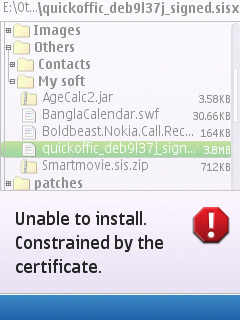
Nokia handsets have been very popular these days. But now a days, sis and sisx installation on the editions of s60 3rd and s60 5th handsets needs appropriate certificate. So that any sis format software that is developed by the third party, can’t be installed in the mobile. If you try to install it, you will see the following text-

i) Certificate expired

ii) Contact application supplier

iii) Unsigned application

iv) Constrained by certificate

v) Unable to install a protected application from an untrusted  supplier
I am here with the solution of this problem.
Required instruments-
  •       You need to have a file named nasir toolbox. You will get it from mediafire. if you face any problem to download, then go to this LINK


  •     Memory card reader or USB cable of nokia handset.
  •     A symbian handset which is not hacked.
  •     A computer (desktop or laptop)

Now follow the procedures-
Step 1-  At first download the nasir toolbox from the following link. You will have to provide a password. The password is PCHELPLINEBD
DOWNLOAD it This is a rar file. You have to extract it on windows 7. After that, you will find the following file/folder-
1.       drweb_antivirus.sis
2.       a folder named Installserver
3.       a folder named 20024113
4.       RomPatcher+_3.1_LiteVersion.sisx
5.       A folder named Patches
Step -2  Now connect your mobile with the PC. If you don’t have USB cable, then connect the memory card via memory card reader.
Step-3  If you connect the mobile via USB cable, then make sure that your mobile doesn’t connected by PC suit. Connect it on the mass storage mode. Moreover, you have to turn off the nokia suit or OV suit. Thus, you can easily enter in the system file of the memory card.
Step-4  Now copy the 20024113 folder on the private folder of your memory card. Make sure that, you are not copying it on the phone memory. If you don’t find the private folder then, turn on the option show hidden files of your PC. Still you are unable to find the private folder then, create a folder, and copy the asked folder in that.
Step-5  After that, copy the following four items on your memory card and disconnect your phone from the PC.
1.       drweb_antivirus.sis
2.       patches
3.       Installserver
4.       RomPatcher+_3.1_LiteVersion.sisx
Step-6  Now install the antivirus named drweb_antivirus.sis on your PC. If you are asked any registration key, just press cancel. So the antivirus will be activated on trial mode. And that will be enough for our next task.
Step-7  Now activate the antivirus, Go to Options > Quarantine> Options> Select all > Options > Restore. See the picture
Step-8  After that, install the file named RomPacther+ 3.1 Lite. After the installation, turn it on and you will find like the following figure

Step-9  Apply the Install Server RP+ and Open4All RP+ 

Step-10  On the above figure, you can see the applied options are marked green. If they are crossed by red color then you have to follow the given procedure.
Now your handset is hacked. Start installing any kind of software. Go to the options of these patches and select add to auto.
If you face any problem:
You will find a file named installserver.exe inside the installserver folder. Copy the file in the C:/sys/bin folder which is in the phone memory. You should paste it with the help of explore or mobile guard. Now you might think that, which version of the file will suit your mobile. For this, you have to search on the Google. Let your handset is nokia c5. Therefore, you have to search like the following-
nokia c5-oo full specification.
As a result, you will find the website of gsmarena. It will be on the top of the search result. Go to that site. From there you will find the full configuration of your handset. On the features, you will find- symbian OS v9.3. This is the required version of the file. Your hacking will be completed without any disturbance.
Here I am giving a link of some supporting software.
*** Note: All Symbian Os9.x, Symbian ^3 , Anna and belle series devices can be hacked by using this method (please use symbian ^3 installserver for both Anna and belle).
Photo source: Pchelplinebd.com

Have you forgot your unused SIM no.?


SIM card is the most essential part of mobile phone. Sometimes we forget unused numbers. But when we really need the number but don’t have balance on that SIM or don’t find card anywhere to recharge it. What to do then? Just follow the codes below according to your SIM.
Grameen- *2#
Banglalink- *511#
Robi- *140*2*4#
Robi- *140*2*4#
Airtel- *121*6*3#
Teletalk- type “AR” & send it to 222.
Or, if you want to know the package you using follow the codes below:


GP-  type “xp” & send it to 4444.
Banglalink- *125#
Robi- *140*14#
Airtel- *121*1*1*1#
Teletalk- type “AR” & send it to 222.
That's all! Nothing more for today. Wherever you are..stay with us!

Create Landscape screen on your Nokia mobile easily


Guys who use Nokia S60V3...I have something for them here. I am sharing with you a software by which you will be able to create landscape of your mobile screen. Don’t understand yet! Ok. Have look at some screenshots of mine.

 If anyone want to make his screen like mine then download the software from here & install it. Then open it so there will appear following image.

 Now select Rotate Me from option.

  After that there will appear an image.


Now exit from option.
 That’s all. If you want to add more features then select the as you wish from Set Me.

Recharge your mobile account from home


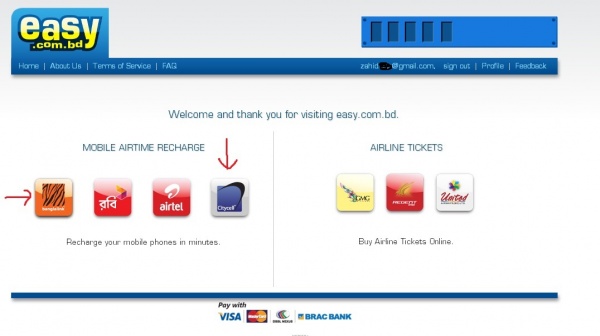
Good news for banglalink, robi, airtel and citycell users. Now you can recharge your account from home. For this, you have to connected with internet connection and you need to have any one of the following cards. Visa Card, Master Card, Nexus Card of Dutch Bangla Bank or Brac Bank Card.you will have to follow the given procedures to recharge on your mobile.
·         Click here to go to the website. You will find like the following figure.


  • ·         Click on sign in. then the following page will appear. You have to fill up the page with your name, mobile number, and email address. Then click on sign up.
  • ·         After that, the following page will come. Click on continue.
  • ·         Then a page will come from which you have to choose your mobile operator, like the following.
  • ·         Then the following page will come. You will be given a verification code on your mail. You have to collect that and set that on the given box.
  • ·         From the following page you have to click on continue.
  • ·         Then you will find the following page. From there you have to choose your desired operator in which you want to recharge.
  • ·         After that, you have to fill up your rechargeable amount, mobile number, recharge package, method of payment like the following figure.
  • ·         Click on confirm from the page showing below.
  • ·         Then the following page will come. From here you will be taken to payment gateway.
  • ·         From here you have to select the method of payment. In the following figure DBBL Nexus is selected. Then click on proceed to pay.
  • ·         After that, a page of dutch bangla bank will appear. In this page you have to give your name, type of your card, number of your card and password. Then click on submit.
  • ·         The following page will come.
  • ·         If a message come from the website of sslcommerz, you will click continue. After that, your account will be recharged by the specific amount and a confirmation message will come to your mobile.
Now check your Dutch bangla account balance. Required amount has been scratch from there.
As you have shared all of your card information in your gateway of payment method, thus there is no possibility of being hacked.

Get your Phone genuine Certificate


Nokia handsets have been very popular these days. But now a days, sis and sisx installation on the editions of s60 3rd and s60 5th handsets needs appropriate certificate. So that any sis format software that is developed by the third party, can’t be installed in the mobile. If you try to install it, you will see the following text-
  i) Certificate expired
 ii) Contact application supplier
iii) Unsigned application
iv) Constrained by certificate
v) Unable to install a protected application from an untrusted  supplier
I am here with the solution of this problem.
Required instruments-
·         You need to have a file named nasir toolbox. You will get it from mediafire. if you face any problem to download, then go to the LINK
·         Memory card reader or USB cable of nokia handset.
·         a symbian handset which is not hacked.
·         A computer (desktop or laptop)
Now follow the procedures-
Step 1-  At first download the nasir toolbox from the following link. You will have to provide a password. The password is PCHELPLINEBD
This is a rar file. You have to extract it on windows 7. After that, you will find the following file/folder-
1.       drweb_antivirus.sis
2.       a folder named Installserver
3.       a folder named 20024113
4.       RomPatcher+_3.1_LiteVersion.sisx
5.       A folder named Patches
Step -2  Now connect your mobile with the PC. If you don’t have USB cable, then connect the memory card via memory card reader.
Step-3  If you connect the mobile via USB cable, then make sure that your mobile doesn’t connected by PC suit. Connect it on the mass storage mode. Moreover, you have to turn off the nokia suit or OV suit. Thus, you can easily enter in the system file of the memory card.

Step-4  Now copy the 20024113 folder on the private folder of your memory card. Make sure that, you are not copying it on the phone memory. If you don’t find the private folder then, turn on the option show hidden files of your PC. Still you are unable to find the private folder then, create a folder, and copy the asked folder in that.
Step-5  After that, copy the following four items on your memory card and disconnect your phone from the PC.
1.       drweb_antivirus.sis
2.       patches
3.       Installserver
4.       RomPatcher+_3.1_LiteVersion.sisx
Step-6  Now install the antivirus named drweb_antivirus.sis on your PC. If you are asked any registration key, just press cancel. So the antivirus will be activated on trial mode. And that will be enough for our next task.
 
Step-7  Now activate the antivirus, Go to Options > Quarantine> Options> Select all > Options > Restore. See the picture
Step-8  After that, install the file named RomPacther+ 3.1 Lite. After the installation, turn it on and you will find like the following figure-
Step-9  Apply the Install Server RP+ and Open4All RP+  


Step-10  On the above figure, you can see the applied options are marked green. If they are crossed by red color then you have to follow the given procedure.
Now your handset is hacked. Start installing any kind of software. Go to the options of these patches and select add to auto.
If you face any problem:
You will find a file named installserver.exe inside the installserver folder. Copy the file in the C:/sys/bin folder which is in the phone memory. You should paste it with the help of explore or mobile guard. Now you might think that, which version of the file will suit your mobile. For this, you have to search on the Google. Let your handset is nokia c5. Therefore, you have to search like the following-
nokia c5-oo full specification.
As a result, you will find the website of gsmarena. It will be on the top of the search result. Go to that site. From there you will find the full configuration of your handset. On the features, you will find- symbian OS v9.3. This is the required version of the file. Your hacking will be completed without any disturbance.
Here I am giving a link of some supporting software.
*** Note: All Symbian Os9.x, Symbian ^3 , Anna and belle series devices can be hacked by using this method (please use symbian ^3 installserver for both Anna and belle).

Now have playstation3 games on your symbian


Ps3 is a very popular gaming system. These types of games are all HD & full of fun. Now you can play these games on your symbian phone.

You will need an Emulator named Scummvm to play these games.
Download from here..
  1. Download for s60v1
  2. Download for s60v2
  3. Download for s60v3+s60v5


Now install the emulator & after that restart your phone.
Now go here to download games.
Now extract the game to memory card. You will find there a folder on the name of that game.
Now open the installed emulator. Select Add Game, following image will appear there.

If there creates any problem to move your cursor after opening emulator. Press call key. You will see CTRL there. Press down ‘0’ & ‘9’. Now once again press call key. Problem solved!
Put your cursor on memory card from there & press OK twice. So that, the folder will be selected in following way.

Then select choose below.
Here will come the details of the game. You can change the language from here. Now press OK.
Click twice on the game.
Now start playing ps3 HD game!!......ENJOY!

Bluestacks app player: now run android games on your PC


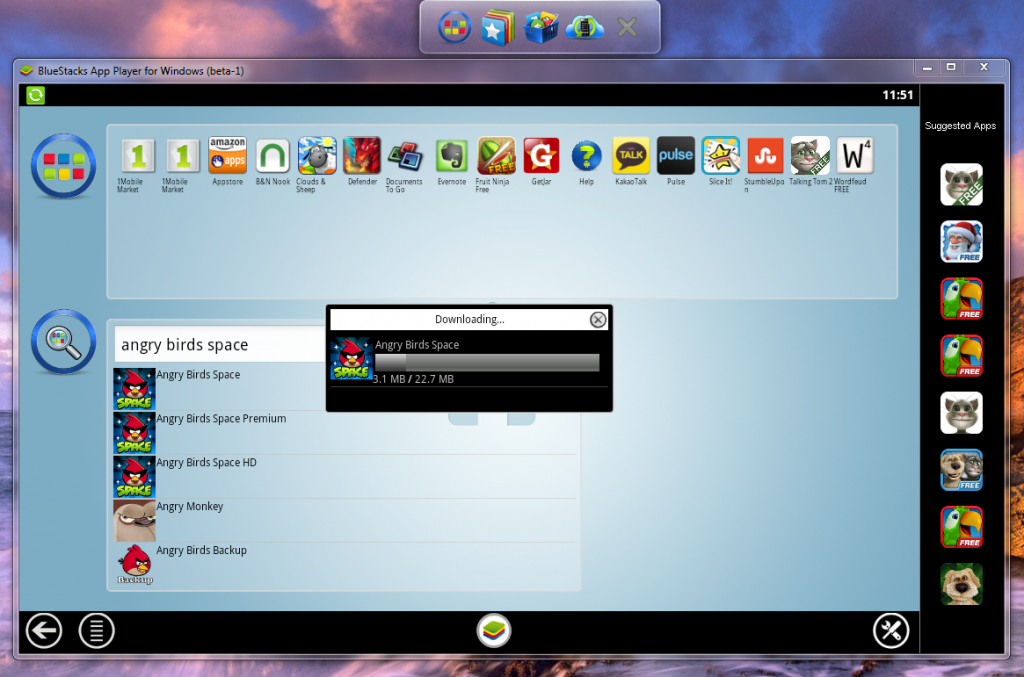
Now you can run android games and apps on your PC. You just need to have a software that is bluestacks app player.
Download it from here.


Install it with the help of internet. If you want then you can maintain an account in bluestacks.
From here, you can install any games, apps, etc as your choice.
If you want, you can keep it by uninstalling. So from now, you can download all games and apps of android mobile into your PC. And transfer it to your mobile, by selecting the option cloud Connect.
You can understand the procedures from the following images-


Recharge your mobile account from home


Good news for banglalink, robi, airtel and citycell users. Now you can recharge your account from home. For this, you have to connected with internet connection and you need to have any one of the following cards. Visa Card, Master Card, Nexus Card of Dutch Bangla Bank or Brac Bank Card.you will have to follow the given procedures to recharge on your mobile.


  • Click here to go to the website. You will find like the following figure.
 
  • Click on sign in. then the following page will appear. You have to fill up the page with your name, mobile number, and email address. Then click on sign up. 

  • After that, the following page will come. Click on continue.

  • Then a page will come from which you have to choose your mobile operator, like the following.

  • Then the following page will come. You will be given a verification code on your mail. You have to collect that and set that on the given box.

  • From the following page you have to click on continue. 

  • Then you will find the following page. From there you have to choose your desired operator in which you want to recharge.

  • After that, you have to fill up your rechargeable amount, mobile number, recharge package, method of payment like the following figure. 


  • Click on confirm from the page showing below. 
 
  • Then the following page will come. From here you will be taken to payment gateway. 
 
  • From here you have to select the method of payment. In the following figure DBBL Nexus is selected. Then click on proceed to pay.
 
  •  After that, a page of dutch bangla bank will appear. In this page you have to give your name, type of your card, number of your card and password. Then click on submit. 
 
  • The following page will come. 
 
  •  If a message come from the website of sslcommerz, you will click continue. After that, your account will be recharged by the specific amount and a confirmation message will come to your mobile.
 
Now check your Dutch bangla account balance. Required amount has been scratch from there.
As you have shared all of your card information in your gateway of payment method, thus there is no possibility of being hacked.