Showing posts with label technology. Show all posts

Solve the hang problem of your computer


  • At first go “run” from start menu.
  • Type regedit & press enter.
  • Double click on Hkey_Current_User
  • Double click on Control panel.
  • Double click on Desktop.
  • Now double click on auto end task from right side.
  • Put the value data 1 instead of 0 and click on OK. Now restart your computer.

Now, your Pc won’t hang ever...Stay cool!!

Outsourcing summit in Dhaka for the very first time


Hello friends… IT freelancing is becoming very popular job sector among the third world countries. Bangladesh is becoming leading outsourcing destination like India, Pakistan, and Philippines. Many people are showing interest for outsourcing. There is a huge potentiality in this sector, as well as there is some restriction also.
Showing the prospects and facts of IT professions, ‘Outsourcing Summit 2012’ is going to be held in Dhaka for the very first time. This summit will take place on 17th November 2012 at The Institution of Engineers, Bangladesh (IEB).
In this summit, many local and foreign outsourcing experts will conduct few workshops, and seminars. Around 850 people can take part on this summit by registration.

Seminar topics:

  • Critical factors of offshore outsourcing.
  • Outsourcing prospects and facts.
  • E-commerce
  • Google ad-sense
  • Freelancing market place.
  • How to be a successful freelancer and entrepreneur
  • Outsourcing fraud
  • Outsourcing vs MLM
  • Cover letter writing techniques
  • Forex trading
  • Job without bid
  • Bidding techniques
  • Affiliate marketing
  • Question and answer
You can win prizes on quiz and raffle draw. Moreover, you will get free lunch pack, CD-DVD regarding tricks of outsourcing and many more gift hampers.

Seminar Resource Person:

Md. Mijanur Rahman
Outsourcing Professional and ICT consultant
Trainer of JobsBd and Bdjobs, Writer,
Faculty of Daffodil International University
Department of Software Engineering

For details:

Creative IT Limited
Orchid Plaza (5th & 6th Floor)
Road # 28 (old), Dhanmondi, Dhaka-1209
Tel : 02-8152402
Cell : 01614-134424
Email : info@os12.com
Website : www.creativeit-ltd.com

Recover your lost data with MiniTool Power Data Recovery 6.6


Hello friends… When it comes to data safety, MiniTool Power Data Recovery 6.6 offers you the most efficient data recovery service. This is 6MB software. It gives the following services.
  • Finds deleted files and folders.
  • Recover data from damaged partition and after re- partition.
  • Recover data from the formatted hard disk.
  • Recover data after system crash, and booting problems.
  • It also recovers data from the CD/DVD, memory card, flash drive, and memory sticks.
 You have to download it from the following link.
Keygen download 

VidShot capturer: a new dimension for snapshot


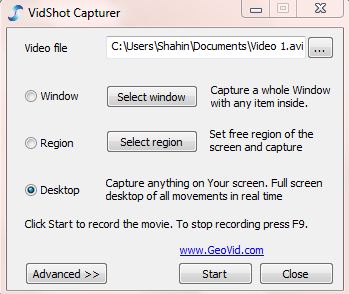
Now it became very easy taking screen shot of desktop, windows or any custom area snapshot with a small software named VidShot capturer. It’s also very easy to use.
1st step:
At first open the VidShot capturer. 
2nd step:
Now select the file name and the folder where you are going to save it.
3rd step:
Here you will get three options for capturing video. Select region to capture anything from your selected area. Now click on Start button.
4th step:
Press F9 to cancel the capture or make double click on video soft icon on Taskbar.
5th step:
Press “yes if you want to make a preview of your caption.

A simple trick of removing virus permanently


Want to delete all virus of your computer permanently? Here is a simple trick to delete all types of autorun.inf, autorun.ini, desktop.ini, new folder.exe viruses from your Pc. And it takes only 1 KB. So, let’s do it!
At first go to Start menu>accessories> open notepad. Copy the following codes and paste on the Notepad. Save it as SR.BAT

Now it only needs a double click and see what happens!

Use free internet with Banglalion or Qubee


Hey friends...How are you all? Again we come with a new tricks of hacking Banglalion/Qubee as we got a lot of response from you guys for this stuff. Here is the whole process for you.
  • At first, open an account on following site.
-->
  • Now go to your E-mail to verify this ID.
  • Then, download a software from here-
  • Open it by winrar or 7zip. You will find a drive there. If you use 32-Bit OS, open the file-x86. Or, if you have 64-Bit OS, then open the file-x64.
  • Wait for a while. Following window will appear there.
  • Click on any key.
  • Now open the software I provided. A pop-up window will appear like following one.

  • At this stage, connect your modem. Open PD-launcher and provide your username and password. Click on connect. It will take maximum one minute. We are done!
Now use internet for free! You will be able to use 100MB by one ID. So open a number of ID as much as you want. But for using various ID, never finish 100MB completely from any ID. So whenever you are about to finish the MB by one ID, connect with another one. By this way, you can browse, download and whatever you wish! Take care!
Photo source: www.techtunes.com.bd

DriveRestore Professional: recovers your deleted partition


Hello friends.. How are you all? Today I am going to share an important topic with you all. We know about partitioning on our operating system. However, many people do not know about this. It means dividing the mass storage of the computer into isolated sections. It improves disk efficiency. Sometimes the partition table is deleted by virus or by accidentally. So if you want to recover this deleted partition, you will need to follow some instructions. At first, download software named DriveRestore Professional. Download the software from below. 
-->
DriveRestore Professional
While download is complete, pen the software. Then you will see a window like the above figure. Lost drive scan will detect the deleted partition so easily. Moreover, lost drive can be recovered with the help of Diagnostic scan.
While the scan of the lost files will be complete, a list of those files will be appeared in front of you. You can review the partitions by selecting tapped panes under the diagnostic report. Let us show you how to recover the partition-

Step 1: Select the drive for analyzing:

You can analyze the drive from the drive selection window. Such as, “Logical Drives”, “Removable Drives” and “Physical Drives”

Step 2: Analyzing the drive:

Click next. You will see a confirmation of drive selection. Click yes, and then you will see a list of the lost/deleted drives. If any drive is not detected, then you will see a message saying, if you would like to run a diagnostic scan. Diagnostic scan will be started sector by sector.

Step 3: Recovering detected drive:

You will see the lost drives on tabbed pane. Explore the drive, which you want to recover. Whenever the drive will be identified, the software will automatically recover it. You have to select Automated recovery. Thus, you are done with recovering the lost drives.