Showing posts with label product. Show all posts

Copy your files easily from corrupted disk


Sometimes files are corrupted in the hard disk. And they restrict us to copy other files. For this, we face lots of problem. But now you will have a freeware software named ‘unstoppable copier’.  It is a 500KB software, you can download it from the following link-


After that, you have to select source and target folder. Then you can copy the desired files except the corrupted files. You can also move the files by selecting move files.

Now spectacles will reduce your weight


Recently Japanese researchers have invented a pair of diet-glasses what will help you to lose your weight. This spectacle of Augmented reality technology tricks with brain. Researcher of Tokyo University said, if you put on this spectacles you can see the food bigger. So that the person will feel he is eating more than he actually does. As a result people, who like to eat a lot, will feel satiety after eating a much lesser amount of food.

Huffingtonpost said, in this spectacle has one kind of image processing what shows you the food you hold in larger shape but not your hand.

Professor Michitaka Hirose  of Tokyo University said, this spectacle really works!!! All psychologists said, there is a relationship between seeing & taking food. So that, this spectacle can control weight by reducing food habit showing food bigger.

Get more on your springpad


Springpad is mainly used for saving important notes. Now it has added some services in it. Now users can save various information or important links in this device. It works almost like the pinboard of pinterest. The same categorized subject will be listed collectively. At the same time, this list will be open for all on the web, so that others can follow the liked links. News from GigaOM.


Springpad has made us known that, they would analyze the issue of the saved link. Therefore, they would provide some helping link to the users. Such as, if anybody saves any restaurants name; this device would serve him with the link of table booking. GigaOM opines that, by doing this not only the earning of springpad will increase, but also the users will be benefited.
It is believed that, evernote and  pinterest is going to get a tough competition with springpad!!!

Control your dream and track it while sleeping


Recently a new app of I-phone catches everybody’s eye in Edinburgh international science festival. This  iPhone app will help you dreaming according to your wish. It plays a carefully crafted "soundscape" designed to evoke pleasant scenes. This new app is named as “DREAM ON apps”. Professor Richard Wiseman, from the University of Hertfordshire developed this app.


Let’s know about it:
  • It needs to be placed under pillow before sleeping.

  • When the phone is placed on the bed, it can detect when the sleeper is dreaming.

  •  It helps to make sweet dreams.

  •   At the end of the dream it activates an alarm to wake the dreamer.

  • And most strange feature is it can record your dream!! Holy cow!!

How to use it:

  • The user has to decide the time of his sleeping and awaking before he goes to sleep.

  • Then he/she has to decide what he/she wants to dream of.

  • Then the phone has to be placed on the bed.

  • Motion sensor will works on apps while the users dreaming of.

  • This app will lessen the possibility of negative dreaming.
Moreover, you can download it free! Even they are planning to develop its Android version!! What else!


Now check out its requirements:

Requirements: Compatible with iPhone 3GS, iPhone 4, iPhone 4S, iPod touch (3rd generation), iPod touch (4th generation) and iPad.Requires iOS 5.0 or later.

For more detail and download this app check out here..


Hidden video recorder for symbian v3 & v5


Video recorder is an excellent app of Nokia Symbian v3 & v5. Now, you can capture video without other people around you recognizing what you are doing in your mobile . Even anybody execute your mobile he won’t understand video is recording there. It will be hidden in task-bar of the phone. So let’s start it without talking more. At first download the following link.


Extract it...now, Install in your phone…. Then Open the app. Next, option->setting. Then select video size according to your set. Like, my Nokia 3250 model supports 320X240 video size. Go to drive and select memory card drive. Then again go to option. Click on start camera. Then record—> hide. That’s it! Your work is done. Even you can lock your keypad by keeping it on!!


Be careful while purchasing a new mobile!!


When we purchase a new handset there is something we should check in. Otherwise we may have troubles later. Let’s check what that is…

DISPLAY:
Many people have mobiles that can’t show high resolution images. Why? Answer is simple. Either their display is small or it doesn’t have that ability.
Now you tell me do you want to have a mobile what can’t show even a 1600 X1200 size image! Of course not!  But how to understand that?

Send a high resolution photo to that mobile from a computer of that store & check its clarity. If it is clear enough then ok. Then check its brightness, color. Now open a browser & type there to check the font size. Is it clear or not?
TOUCH SCREEN:
These days everyone wants mobile that has touch screen. It’s totally “in” now!! So let’s know how to check it at the time of purchasing.
Open message option or notepad from your desirable mobile. Now think about something what you can type in 1 minute. And start typing. Stop after 1 minute.

Did it co-ordinate well with your typing? If yes, then it’s fine. Otherwise you should rethink of purchasing it.
CAMERA:
Let’s examine it too.
Take some picture with that camera. Select proper color & full size. Now all you have to do is to check that pic very carefully. If you are satisfied enough with its quality, take it! Don’t forget to check its video in the same way. And of course make sure about the pixel. 

Sometimes it is written 6 or 7 mega pixel there but actually it is not.
DESIGN:
This is just what we are looking for. An out dated mobile is nothing but a trash. Where a stylish & updated mobile makes you more fashionable and trendy!!

 So when you are purchasing one. Don’t be panic. Think carefully and choose a perfect one that matches your personality.
OTHER FACILITIES:
We don’t pay much attention to warranty or money receipt while purchasing. But later these things are mostly needed.

 So at the time of purchasing your mobile check guaranty, warranty, money receipt, how long charge lasts etc.
NETWORK:
All these things will be fruitless if mobile doesn’t get sufficient network coverage. So it is very important to check internet, network etc.

PROCESSOR:
Play a video on that mobile. Is it running well? Watch out the time between opening and playing the video because it will tell you the speed of processor.

Now open some apps from mobile setup & keep capturing video. If processor stops there or mobile turns off for a while then it is mentioned that the processor is not good enough.
SOUND QUALITY:
 I like listening music, FM radio over phone. I think most of us do. So if sound quality is not satisfactory it will ruin everything else too.

Hence, open mp3 player & play a song with full volume. Also check that sound through headphone. If you like it then what else!!!

So friends..enjoy with your new handset!!


New I-pad already grabbed 10% of all I-pad traffic


Recently, ad network firm Chitika said, 10percent of all I-pad web traffic of USA is coming from the new I-pad which bought just one month ago.
Chitika provides 4000 millions advertisements per month to different websites. And Chitika can also track the location and type of device using. On the basis of that tracking result it showed the picture of the use of new I-pad in USA recently.

I-pad 3 came into the market with extra advantage of retina display & speedier internet. Though many analysts said the people who were waiting for I-pad are not satisfied with this. But, having 10% of all I-pad traffic of whole USA during one month is not a matter of joke!!

New tablet-“Intel studybook” for students..


Intel has announced on Tuesday to bring a new tablet device into market for Students of developing countries. This tablet named “Intel study book” has been made up very strongly as it wouldn’t break even it drops down from any child’s hand- news of Mashable.
The report said it comes loaded with Intel Learning Series including an interactive e-reader and LabCam applications. Moreover it is water & dust proof. It has been dropped down on concrete from 70cm above to test its robustness.
Wayne Grant, director of research and planning at Intel threw the device from one side of the table to another while talking. He wanted to prove its sturdiness.
It has 7-inch wide multi touch LCD screen with 1060 x 600 pixel resolution & powered by Atom Z650 with a clock speed of 1.5GHz. It is able to run either windows 7 or Android honeycomb. Moreover there are 2 cameras on both sides (front and rear-facing) of it, light sensor support & microphone. It offers 5.5 hours of battery life on active usage. Grant said its price range would be below $200.

Virus attack on 600000 Apple computers


More than 600000 Apple computers are attacked by a new virus. After this attack there is a possibility to go the control of these computers to the hackers-said Russian anti-virus firm Dr Web.
Dr Web spotted this attack and told about this expands of “Flashback Trojan” on Saturday. It says that more than half of those numbers are based in the US & about 20% are based in Canada.
Dr Web said “many analysts used to say that Mac operating system can’t ever be infected. This occurrence has proved them wrong, of course!”
This Trojan has started spreading out since last September by Adobe flash update. AS soon as installing this infected update of Flash software it brings some changes in security settings. Hence the hackers are potentially able to control that computer. By taking advantage of some weakness of JAVA language, the later version Trojan is automatically installed on that computer- said the report.
Recently Apple has released patch to solve this problem-news of ABC news. They suggest installing this patch every Mac users removing the safety problem.

"Terminator glass" is coming


Recently Google said they have made proto type of augmented reality glass and that is being examined–news of Reuters.

Source said augmented realty glass is a type of digital glass. It can be used for photo capturing, video chatting & getting direction from Google map.
This type of glass was shown in the movie “Terminator”. That’s why many technological sites have named this glass as “terminator glass”.

Google has posted a video on this project named “Project Glass”. And this information is given on a page of Google. Google has said that the information about this project is revealed to know about the expectation of the users of this glass .But Google did not mentioned about when this glass will be available in market.

Instagram is now on android too


Instagram is one of the popular apps of I-phone, I-pad & I-pod touch for capturing & sharing photos. It is now arriving on Android too. Registration has also started on their site for Android users- news of The Next Web.
Android users will be able to use this app by using their E-mail address before instagram will arrive at Google play, Amazon store & other apps store – said The Next Web. It has already won the heart of 27 million owners of IOS devices. But the authority has declared this Android version of instagram will be more developed & characterized.

Instagram is not available on Google store


Instagram is a popular app of capturing & sharing photo of Apple I-phone. When Android users heard the launch of Instagram on Android, they were just counting the days. At last it has released on Google play formally. But many users did not find it on that day!! This news is collected from The Next Web.
We know, to download any app of Android operating system of Google it needs to go to Android market, recently what is named Google play. Next Web said persons who searched for Instagram on Google play continuously 5hours after launching it; they got other apps like Instagram in the beginning. That means, though there should be “Instagram official app” on the top of the result page, Google took 5 hours to update it.
As a result, many users have downloaded different apps what have similar name with Instagram but only purpose of those is being downloaded more. This problem has been seen on Google play from both Android device & computer browser.
But after that Instagram has been placed on the top of that result page- said The Next Web.

Telenov opens up Scout for apps- a GPS navigation system


"Telenov is going to introduce a new kind of navigational framework for the mobile application developer. By this new framework developers can add GPS navigation to any kind kind of applications." - News by techwar asia.


This new navigation framework is called scout.This is actually a browser dependent turn by turn GPS navigation system, which developers can add to the application very easily. The great advantage of this framework is , users can locate the direction anytime, they don't have to close the or open a new connection.

Telenov said, this is made by HTML 5 and its great advantage is it help the users to reduce the cost of their battery uses.All they have to do is , they need to open a mini browser , where this navigation system scout will run. Because of its browser dependency it take less battery power where a normal application take more battery power.

Blackberry wishes to regain their corporate market


Recently, Blackberry manufacturer Research in Motion Phone(rim) said, they are again rolling back corporate customers for their business.

The announcement from rims comes in a way, when a few days before they said they are in loss because of the less selling of smartphone. Till March 3 , this Canadian has experienced losses from 1 to 5 million dollars total in the period of three months. In contrast, only a year ago at the same time, they gained 934 million dollars.


The reason behind the blackberry’s market loss is, as their main customers switched to the iPhone and other smartphone which has android.Blackberry announced their target to regain the corporate market again, with this, the departure news of co-executive Officer Jim balasili and Chief Technology Officer David yacht has come. Let’s see what they can do now?

How to Transfer Data from One PC to Another through Wi-Fi


May be a few people have used the Oldish Infrared technology. But all of we are used to transfer files through Bluetooth. But either infrared or Bluetooth, no one can transfer files very quickly. We know infrared does it very slowly but even Bluetooth takes minimum 15minutes to transfer only 10MB.So, except transferring small files it’s pretty much bothering using Bluetooth.


Now-a-days we all are familiar with the new technology named Wi-Fi. Now Wi-Fi is given in every laptop as built-in. As a result its popularity is increasing day by day. But many of us only know the use of Wi-Fi as sharing/using internet. At the very beginning I was also at unknown that Wi-Fi can also be used for transferring data. But it was normal because there wasn’t any easy way to transfer files through Wi-Fi. It was only possible for experts.


Many of you already used this software named connectify for internet sharing through Wi-Fi. Because it’s just amazing in this field!
And the best thing is, now this software is not only limited in net sharing. Recently it has added new features in their new version 3.3.So, through Wi-Fi file transferring becomes more easy n quicker now with this software.

There are two versions of Connectify-
  • Lite
  • Pro
In version-lite you will be able to transfer one file only one time a day. It is being used for net sharing yet .But Pro version is just unlimited!!So who want to purchase, click here to purchase it for $29.Otherwise follow the installation process given below.

Installation & cracking process:
  • After downloading install ConnectifyInstaller.exe file to your computer. And restart your pc from installation.Beside the clock at the status bar, press right button on the icon of Connectify & click on Enter License option.
  • Open the file Read ME.txt   from downloaded folder & define your Email & License Key at Enter License. Then click OK.
  • Copy the Administrator.ui.xml file From downloaded folder & paste it at the folder located in
          %AllUsersProfile%\Application Data\Connectify\settings (Windows XP)

           %PROGRAMDATA%\Connectify\settings (Windows 7 & 8 ) .

  • Go to C:\Windows\System32\drivers\etc & open the file
  • Hosts on notepad & type-127.0.0.1 updates.connectify.me  at the footer .


NOTE- If there occur any problem in editing the file Hosts then, at first go to Control Panel/User Accounts and Family Safety\User Accounts on Windows Explorer & click on
Change User Account Control Settings.


After that go below to Never Notify & click OK.If confirmation is needed there press Yes. If it asks for restart the computer, do it.


Now you can edit the Hosts file.
·         Wow! You have installed & cracked Connectify successfully.


How to transfer files & share net from one computer to another


You have already done the main task. So, now it’s very easy to transfer file & net sharing….
·         At first open the software & click on Start Hotspot (in case of sharing net you have to select Automatic from Internet to Share).

·         Now go to the other computer you want to you want to transfer files or share net & search Wi-Fi. So that you will get the Access Point of your computer. Connect it. Now you can use the shared internet in this computer.

·         If it is about transferring files then see the following steps.
Ø  Go to your computer. Open connectify. Click on Clients tab.Here you will see the other computer your computer is connected with. Now  drag the file you want to send to & drop that or click on the spot like below's screenshot.& select the file manually.

Ø  There will be a dial box in the other computer like following. Click on save as & show where you want to save it.

Ø  That’s how file transferring has been starting. Speed will be  5-10 MBps.And if the computer is put together it will get more speed.

Ø  Now say  “goodbye” to pen drive J

How to transfer files to mobile from computer

You know it’s easier to transfer files to mobile from computer. Here I am going to discuss about the process of NOKIA. But it will work in other set also.
Ø  Start hotspot through connectify from computer (follow the 1st step of transferring file from pc to pc).
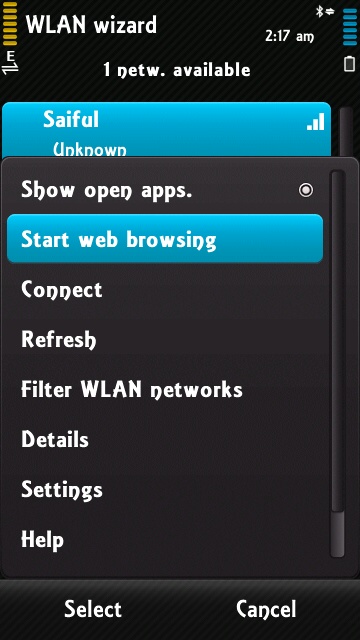
Ø  Go to Settings > Connectivity > WLAN on your mobile (applicable in Nokia. In case of other set connect to Wi-Fi).
Ø  Here you can see the shares connection. Click on Start Web Browsing from option. If there appears Checking Internet Connectivity, cancel it.

Ø  Now drag & drop the file you want to send from your computer to mobile & send it. A dial box will appear there with an address.

Ø  Type the address on your mobile browser & visit it. A page will appear with Files for You. Yes! That will be your shared file. & when you will click on that download will start automatically.


Ø  After a few minutes download will complete!!


Save your mobile balance from the fake offers


Is the balance of your mobile phone decreasing day by day? It is strange! Where is going tk 2.30 per day?


If you are facing this type of problem for a few days, then this tip is for you. Recently some fake people are spreading some attractive announcement on the internet with the help of Google ads. Those who have already faced this problem are familiar with the following ads-

  •        By giving your cell no. and just click on ‘Go ahead’. Then you will get a confirmation sms, on the sms you will get a code, which you have, to type on the site. Afterward your registration is completed. That means everyday tk2.30 is going to be slash from your account. However, you won’t understand anything of the matter!!

  •        Let’s  pay a little attention on the following ad-

  •      ‘This is a mobile application download service that offers entertainment contents (wallpaper, animation, games, application, video, etc.) for Free of Charge given that a nominal daily subscription fee is applicable. Daily Subscription fee: TK 2.00 15% VAT. Registration and first download from the portal is completely FREE. In addition, a user will receive 1 bonus credit download for the first time subscription to service. Everyday an active user will receive 1 FREE credit to download his/her desired content from the portal (http://binbit.bd.amob.com) against this subscription fee. All content in the portal is equivalent to 1 credit download. Free download credits are useable till 7 days period; in other words, unused free credits will expire after 7 days. Once Free Credits are used up, a user is also allowed to download additional contents at regular price: (wallpaper at Tk. 10, Animation at Tk. 10, Games at Tk. 40, and Video at Tk. 30. MP3 tones at Tk 20. Etc.) In all cases, 15% VAT (value added tax) is applicable. Once successfully subscribed, a user will receive one welcome text (detailing service price, free content download info and deactivation info). An active user will receive free content link every day. Data charge is applicable based on respective data package of the user. For instance, data charge for a GrameenPhone P1 user is Tk 0.02/kbps. Service Activation key: BIN (sms BIN to 16261) Service Deactivation Key: BIN OFF (sms BIN OFF to 16261) Help Key: HELP (sms HELP to 16261)’


From the above ad, it is not clear that, actually what is offering in what price!! However, everything has a good side. That is, if you want to deactivate this offer then you have to type ‘"BIN OFF" then send a sms to 16261.

So………..hurry up! Stop the unnecessary cut of money from your mobile phone! Moreover, share this news with all of your well-wishers…

You can watch the IPL from your mobile handset


Hello guyzzz…
Today I am going to share a necessary thing with all of you! Many of you have heard about live TV or live PC. But I will share information about live mobile TV!!! I am going to give you a link; from this link you will be able to enjoy the live IPL match from your mobile… Furthermore you can also watch other TV channels and games also! The link is as follows –
Go to this link, and then go to sports channel. Then go to set max and enjoy your game!!

‘I-pad’ – the newest device of APPLE


Apple has disclosed their latest tablet device. The discloser has occurred last 7march in a program in San-Francisco.
Now a day’s the whole world is acquainted with I-pad. Everyone was thinking that the name of this device would be I-pad3, I-pad HD, I-pad 2x etc. but all the imaginations have left behind. And Apple has named it only ‘I-PAD’.
Let’s see what changes have been done on this newest device.


As you see in the picture there has been mentioned difference of the high definition retina between the 1024x768 pixel display of I-pad2 and 2048x1536 pixel display of new I-pad. Apple has said, “Pixel density is so high your eye is unable to distinguish individual pixels.” So it can be easily said that this stunning advantage of the new I-pad is going to be eye-catching to the users!! Rayan block has updated in twitter after get the I-pad on his hand, ‘It’s the best display I’ve ever seen. Anywhere, period.’
Though the new I-pad looks like its old version, but there is a huge difference among the hardware’s. In this new I-pad, an extremely swift processor has been added. This is called ‘quad-core’ 1 gigahertz apple A5x. Apple states that this processor is 2times powerful in processing and 4times powerful in graphics rendering than the A5CPU used in the I-pad 2.


 Voice dictation advantage has been included in the I-pad. In the older versions this work had been done by voice activated personal assistant, named ‘siri’. But in the new version you just need to press on the microphone icon of the virtual keyboard. I-pad supports American, British, and Australian English, Japanese, French, and German language for the voice dictation temporarily.


The another surprise of this new I-pad is the 5 mega pixel rare facing isight camera which can make video shoot of 1080p hd. I-pad2 had a camera of 7 mega pixel, which used to provided-with 720p video recording. The personal photo editing software of apple ‘iphoto’ can be used for I-pad now. By using this application, users can get the benefits of photo editing, giving different surprising effect, sending pictures to the different device, Icloud and sharing the photo in the social networking site. If anyone wants to make photo journal, he can make it easily with this application. Moreover digital scrap book can be made in which users can attach map, notes etc. this application will cost most probably $5.

4G light connectivity benefit has been included in I-pad. 4G works in 10times speed than 3G by data networking. I-pad also supports 3G data networking besides 4G.

The new I-pad has bought an excellent feature name ‘personal hotspot’. It can connect with other 5 devices by the wifi, blue tooth, and USB cable.
Powerful battery is needed for retina display, 4G connectivity and other contemporary benefits. The authority of apple didn’t avoid this. It has a powerful battery which will make a back up of almost 10hours. That means you can run the I-pad continuously almost 10 hours by charging 1time.
There are some more application in I-pad as built in. they are, safari, mail, messages, photos, news stand, up store, I tunes, videos, maps, music, game centre, photo booth, you tube, contacts, remainders, calendar, notes, camera. Moreover in the up store there is a huge collection of applications.

Price of I-pad including only WiFi :
  •  16 GB –$ 499 
  •   32 GB – $599
  • 64 GB - $699 
Price of I-pad having 4G : 
  •   16 GB – $629
  • 32 GB – $729
  • 64 GB – $829

These were a little information about the I-pad. Hope this is going to be useful for all.