Showing posts with label software. Show all posts

Download Free 8086 Emulator


Emulator 8086 is a great tool for assembly language coding / your microprocessor course. The great feature in emu 8086 besides the functionality you will find a vast solution of assembly language in example file. Here I am providing you the emu 8086 software. This software will run both in windows 32 bit / 64 bit computer.


_________________________________________________________

Download Free Notepad++ version 5.9.8


Notepad++ is a great tool for any web work/ apps work/ any other work. Notepad replacement with an eye toward programmers. The interface is much simpler compared with some of its competitors. A familiar row of icons with their mouse-over labels sits at the top, and one row of tabs is just below that. The rest of the screen is made of nothing but pure white space. All the coding tools live in the menu bar, with some represented on the toolbar. Users can compile and run macros, convert text to Hex, submit directly to W3C for validation, launch in Firefox and IE, and more. There's also a built-in spell-checker.


Download Link: Click here to Download Free 
___________________________________________________________

Recover your lost data with MiniTool Power Data Recovery 6.6


Hello friends… When it comes to data safety, MiniTool Power Data Recovery 6.6 offers you the most efficient data recovery service. This is 6MB software. It gives the following services.
  • Finds deleted files and folders.
  • Recover data from damaged partition and after re- partition.
  • Recover data from the formatted hard disk.
  • Recover data after system crash, and booting problems.
  • It also recovers data from the CD/DVD, memory card, flash drive, and memory sticks.
 You have to download it from the following link.
Keygen download 

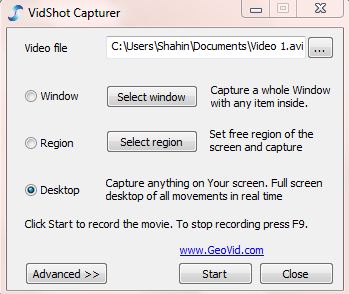
VidShot capturer: a new dimension for snapshot


Now it became very easy taking screen shot of desktop, windows or any custom area snapshot with a small software named VidShot capturer. It’s also very easy to use.
1st step:
At first open the VidShot capturer. 
2nd step:
Now select the file name and the folder where you are going to save it.
3rd step:
Here you will get three options for capturing video. Select region to capture anything from your selected area. Now click on Start button.
4th step:
Press F9 to cancel the capture or make double click on video soft icon on Taskbar.
5th step:
Press “yes if you want to make a preview of your caption.

DriveRestore Professional: recovers your deleted partition


Hello friends.. How are you all? Today I am going to share an important topic with you all. We know about partitioning on our operating system. However, many people do not know about this. It means dividing the mass storage of the computer into isolated sections. It improves disk efficiency. Sometimes the partition table is deleted by virus or by accidentally. So if you want to recover this deleted partition, you will need to follow some instructions. At first, download software named DriveRestore Professional. Download the software from below. 
-->
DriveRestore Professional
While download is complete, pen the software. Then you will see a window like the above figure. Lost drive scan will detect the deleted partition so easily. Moreover, lost drive can be recovered with the help of Diagnostic scan.
While the scan of the lost files will be complete, a list of those files will be appeared in front of you. You can review the partitions by selecting tapped panes under the diagnostic report. Let us show you how to recover the partition-

Step 1: Select the drive for analyzing:

You can analyze the drive from the drive selection window. Such as, “Logical Drives”, “Removable Drives” and “Physical Drives”

Step 2: Analyzing the drive:

Click next. You will see a confirmation of drive selection. Click yes, and then you will see a list of the lost/deleted drives. If any drive is not detected, then you will see a message saying, if you would like to run a diagnostic scan. Diagnostic scan will be started sector by sector.

Step 3: Recovering detected drive:

You will see the lost drives on tabbed pane. Explore the drive, which you want to recover. Whenever the drive will be identified, the software will automatically recover it. You have to select Automated recovery. Thus, you are done with recovering the lost drives.

Net meter: monitors your bandwidth


Hey friends…. The world has become broad by the blessing of internet. You can use broadband connection or any wireless connection. Today I am here with new software that will monitor your bandwidth.
Name of the software is Net.meter. You can check your daily, weekly, and monthly usage. If you want, you can save these data into MS excel by the export option. This is a freeware. You do not need any license. Download the software from the following link.
After download is completed, install it.

Now Attach files to E-mail as many as you wish


Have you ever faced any problem to attach a large file with an E-mail? Here is the solution for this problem! You can use “Winmend file splitter” 
Try it by yourself and suggest your friends too!
  • At first determine the file which you want to split over, select button source file. Later it needs to select an output folder.
  • You can increase the block numbers freely. After that, only click on split button.
  • Later go to Out folder to attach the split files with the E-mail.

Ulead GIF Animator: Free online image editor


Hello friends…how are you all? Today I am giving you an interesting software to make animation files in gif format. This is small software of 5.5 MB. Name of the software is Ulead GIF Animator.
You can complete the task through drag and drop method and can have amazing effects. Besides text effects, you can attach video effect also!
Flash, AVI, MPEG and QuickTime format will support on its output. Download the software from the following link-
This is portable software; you do not need to install it.
So friends… keep creating animation file!!!

Deepfreeze uninstaller: make your system like before


Hello friends… how are you all? Few days ago, we shared with you about deep freeze software. It keeps your system safe and secured even without any antivirus. But, there is a problem with this. You cannot make change to your c drive while the deep freeze is installed into your drive. However, you face problem with uninstalling this software. But not to worry friends… today I am going to show you how to uninstall this.

How to uninstall deepfreeze:

  • At first, disable the software. For this, double click on the deep freeze icon by pressing the shift key of your key board. Or you can press CTRL+ALT+SHIFT+F6 all together. Now give your password and press ok. If you do not have any password then press ok. However, if you forget your password, then you have to download the anti deepfreeze software.
  • You can download this software from the following link-
              Download Anti deep freeze 
  • Open any software. select Open new process and click on start. Then press ok without any password. Then a dialogue box will appear on the Boot Option. Select Boot Thawed from here. press ok and restart your computer. You are successfully done to disable the deep freeze.
  • Now open the file from where you installed the deep freeze. Click on next, then click on uninstall. Wait for a while. Your PC will automatically restart. If it does not, then you have to restart it. Deep freeze uninstall is completed.
So friends… let us know, if this trick worked or not. That is all for today. Good bye!!

Wise care: makes your old PC run faster


Hello friends…. How are you all? Are you facing problem with your slow operating system? I am here with a super solution of this problem. I will give you software that makes your PC so fast. It is a comprehensive application that helps your PC run faster. In Bangladesh, its present market price is above tk 2000. Now you can get it free!
For this, you will have to follow some instructions-
  • At first, download this software from the following link.
              Download it 
  • Then install it.
  • To get register, enter your email address. And enter the following serial key when required-
  
  • At last, it will start to check your PC. It will remove more invalid and junk files to free up much more space.


LightBox Free Image Editor: edit your image magnificently


Hello friends how are you all? Today I am giving you  software which will edit your picture so nicely! Name of the software is LightBox Free Image Editor. It can edit images automatically. You can manually change the contrast, color combination etc. so that, your images look great!
Download this software from here.

 
After the download, extract the file with winrar and you will get a setup file. After installing, an icon will appear on the desktop. Double click on that icon and start editing your picture!
This is a freeware and you can run it on windows XP, windows 7, windows vista etc. you do not have to be bothered for the dialogue box of trial and free version. Tick on do not ask me again, which is marked red on the above image. You will not see the dialogue box again.
So friends…enjoy image editing with LightBox Free Image Editor

Run Java software on computer


Usually we run many Java software in our mobile. But there is always a risk of virus attack. So, it would be great if there was a chance to check those on PC before using in mobile. Specially it reliefs from the risk of virus attack. If you want to try it, then here we are only for you. Just follow the instructions given below-
  • At first download the Java Runtime from this link- http://www.java.com/getjava/
  • Now setup the software.
  • Secondly, download Micro-Emulator from this link- http://sourceforge.net/projects/microemulator/ and extract it.
  • Then click on microemulator.jar on extract folder to open the software.
  • Now drag and drop any .jar software to microemulator.jar. It’s ready to run on your PC now. Just click on Start button. Let us know how did it work!

Deep freeze: software that keeps your drive safe from virus


In recent time, we cannot think to operate our PC without antivirus. But there is many problems with antivirus. Most of them make our operating system slow. Moreover, you have to update the antivirus regularly. Forget all these hazards. From now you can operate your PC, even without antivirus!!!
Today I am going to talk about deep freeze. This is such a software, which keeps the operating system 100% secured. If it is installed into your PC, there is no need to scan your PC.

Let us have a look how the deepfreeze works:

Mainly it keeps the configuration and settings of the computer unchanged. If any virus attacks your computer, you just have to restart the PC. You are done with the virus!! by installing this software, you can easily research on virus or any hacking site. Because you are full secured.

How to set up:

  • You have to install the deepfreeze into C drive.
    When you install it into a drive, you cannot save any file on that drive. Moreover, it is better to install the operating system at first, and then set up it. And the benefit of installing the deep freeze only into C drive is, you can save any files and folders into any drive. 
  • While you finish the set up, your PC will automatically restart and you will see a dialogue box. Click ok and lock the drive with password. If you do not need to save any file, then you can activate deep freeze in all the partition.
  • Once you setup deep freeze you cannot remove it. So, you should know about the uses before you set up it. If required, then open the deep freeze and change the configuration as your demand. You can also save files to the other drives where deep freeze is deactivated.
  • By pressing the shift key, click on the deep freeze icon. You will see a dialogue box. Give password and press ok. Select Boot thawed, press ok for twice, and restart your PC.
  • After saving the required files, open deep freeze like the one before you did and select frozen.
  • You have to remember one thing, if there is already any virus in your computer then this process will not work. So at first, you have to scan your system with an antivirus.
Download deepfreeze 5.0 full version.

Increase your net speed by following some steps


We use various software to make our net connection speedy. But if there is a problem with the registration key, then no software will increase your net speed. Today I am going to give you some tips about increasing the net speed. At first, you have to edit the registry key, and then you can get the speed by third party utility.
1st step:
At first, give the following command
Start> Run> type: regedit
The registry key will open and you have to go to the following address.
After going there, you will find a key like {D6277990-4C6A-11CF-8D87-00AA0060F5BF}. Delete it. Do not be afraid because if you want, you can keep the back up.
Come out from the registry.
2nd step:
Now some more registry key need to be edited. They are-
  • For windows XP:
1.       Go to Start >Run, type gpedit.msc and press enter.
2.       Expand the Asministrative Templates  by clicking on (+)
3.       Expand the network by clicking on (+)
4.       Click once, on the QoS Packet Scheduler.
5.       Then click on Limit Reservable Bandwith and mark on enabled box.
6.       Then convert the bandwith limit to 0%. It remains in 20% normally. Click on apply and restart your PC.
7.       Stop the automatic update of windows XP.
Restart your PC. By following this procedure, your speed will increase upto 20%. This tricks is only for XP users. Others must not apply this.
  • For windows vista/7:
1.       Disable the automatic update of windows vista/7. For this, go to Control Panel > All Control Panel Items > Windows Update > Change Settings. There you will find an option named Important Updates. You have to customize that option on never check for updates, instead of Install Update Automatically. Then you will find two more options. They are- Give me recommended updates the same way I receive important updates and  Allow all users to install updates on this computer. You will have to remove the tick mark from those options. Click ok and come out from control panel.
2.       If you use firefox then follow the given procedure.
a.       Open the firefox, type about:config on the address bar and press enter. If any warning is shown, then ignore it. Type network on the filter box. Then, modify the network.http.pipelining and set true. After that, go to network.http.pipelining.maxrequests and set the number 4 upto 8. Then restart your browser.
3rd step:
  • Some general tips:
1.       If your net connection is too slow, then go to the option of the browser and stop image loading. Such as- in case of firefox, go to Option > Content and remove the tick mark from Load images automatically.
2.       Delete the history,catch and cookies regularly. And keep the important sites into favourites.
3.       Keep the browser homepage on www.google .com. incase of firefox, the default site is http://en-US.start3.mozilla.com/firefox?client=firefox-a&rls=org.mozilla:en-USfficial. You should not change it.
4.       You will get a huge number of add-on for the browser. You should not use these.
5.       Do not use any theme on your browser it makes the browser slow.
6.       Do not change the default browser frequently. Moreover, do not import the history and bookmarks of one browser to another.
7.       There is some software to check the net speed. DU meter is such a software. If you want, then you can download it from the following link.  Download DU Meter From Here  http://www.ziddu.com/download/13162577/DUMeter-Install.rar.html
8.       Always use a good antivirus to keep your system secured. Some good antiviruses are Norton Internet Security/Eset security/Bullgurd/Panda/AVira Security. Moreover, you can use avast antivirus. But never use more than one antivirus at a time. It may make your system crush.
4th step:
Now you have to use a third party software named, speedy fox. Run the software and click on optimize. Then restart your PC. You can download the software from the following link-
Finally, one thing to say that, all the work you have to do by disconnecting your net connection. If you face any problem, then take help from any professional. Beside this, we are always here to serve you. If you are afraid of editing the registry key, then follow the 4th step. It will increase your net speed upto 45%. That is all for today. Please inform us, if you are benefited or not.

FILEminimizer : Software that minimize the image by keeping the same quality


Now you can minimize the size of your image even without changing the image quality! For this, you will need a software named FILEminimizer Pictures. This 4.85 MB software will reduce your file size by compressing it automatically. At first, download the software.
Then extract the file with winrar and you will get the set up file. after installing the software, you will see an icon on your desktop. Click on that and you will get like the following figure-
Now follow the instructions-
  • Select the picture, which you want to compress.
  • Select a place for the compressed files.
  • Click on Optimize Files for automatic compression.
  • You can also customize the size of the pictures.

So friends, enjoy the image compression. Let us know if it was useful to you.

Download subtitles of any movie


We all watch English movies. But sometimes it gets tough to understand the language properly. That’s when we need subtitle. But subtitle is not given with the movie all time. We have to download it from internet. Today I am going to share a software for downloading subtitle. Try it…I use it often.
  1. At first download the software. Run it after installing.
  2. Select the movie from your computer.
  3. Click here & wait for a while.
  4. Here you will get a number of subtitles. Double click on the subtitle for downloading. It will be downloaded in the folder where you kept the movie.

Thnk you all!

Use anti-porn and ignore indecent sites.


May be your PC is also used by your children. They can frequently enter in the porn sites. It is harmful for their mental development.
To get rid out from this problem, use anti porn software. It has already blocked more than thousand sites. This software is developed in English, Japanese, Korean, Russian, German, French, Spanish, Chinese.
Not only porn sites, you can block any sites with this software.
Which operating system will support this software-
Windows XP, Windows 2000, Windows Vista, Windows 2003, Windows 2008, Windows 7, Windows 8 will support this software.
Which browser will support this software-
Internet Explorer 6, Internet Explorer 7, Internet Explorer 8, Firefox, Chrome, Safari, Opera.


Download it from here 

Recover deleted files using "Undela"


Sometimes it happens that we delete any important file mistakenly from any drive& even from recycle bin. That times how to recover those files? I can suggest you a software what can help you in this situation. It is named “Undela”. It is very small in size & runs very easily on PC.

Process of using it:
Step- 1:  at first download the software from this link. Now install it.
Step- 2: Open the software to select any drive of my computer from left side list. Scan that drive. Check the deleted file & click on recover.
If you are searching for any specific formatted file then you can specify that on search bar. For doing that go to file>option from menu bar & check your desired file.


Step- 3: select the drive where it will be restored & click on OK. Now check the drive you selected.
You will get back your deleted file there. Take care! 

Now creat video tutorial very easily


we know the desktop of the computer can be captured by various software.
However, most of this software is of trial version. For that, the name of the company is above the video. To solve this problem, I am here with new screen recording software named camstudio. If you capture your screen with this software, you won’t find any advertisement above the video. By using the shortcut key, you can start video recording by minimizing the software. Moreover, you can save your video on SWF mode. Download the software from the following link-


Hack nokia mobiles


Nokia handsets have been very popular these days. But now a days, sis and sisx installation on the editions of s60 3rd and s60 5th handsets needs appropriate certificate. So that any sis format software that is developed by the third party, can’t be installed in the mobile. If you try to install it, you will see the following text-

i) Certificate expired

ii) Contact application supplier

iii) Unsigned application

iv) Constrained by certificate

v) Unable to install a protected application from an untrusted  supplier
I am here with the solution of this problem.
Required instruments-
  •       You need to have a file named nasir toolbox. You will get it from mediafire. if you face any problem to download, then go to this LINK


  •     Memory card reader or USB cable of nokia handset.
  •     A symbian handset which is not hacked.
  •     A computer (desktop or laptop)

Now follow the procedures-
Step 1-  At first download the nasir toolbox from the following link. You will have to provide a password. The password is PCHELPLINEBD
DOWNLOAD it This is a rar file. You have to extract it on windows 7. After that, you will find the following file/folder-
1.       drweb_antivirus.sis
2.       a folder named Installserver
3.       a folder named 20024113
4.       RomPatcher+_3.1_LiteVersion.sisx
5.       A folder named Patches
Step -2  Now connect your mobile with the PC. If you don’t have USB cable, then connect the memory card via memory card reader.
Step-3  If you connect the mobile via USB cable, then make sure that your mobile doesn’t connected by PC suit. Connect it on the mass storage mode. Moreover, you have to turn off the nokia suit or OV suit. Thus, you can easily enter in the system file of the memory card.
Step-4  Now copy the 20024113 folder on the private folder of your memory card. Make sure that, you are not copying it on the phone memory. If you don’t find the private folder then, turn on the option show hidden files of your PC. Still you are unable to find the private folder then, create a folder, and copy the asked folder in that.
Step-5  After that, copy the following four items on your memory card and disconnect your phone from the PC.
1.       drweb_antivirus.sis
2.       patches
3.       Installserver
4.       RomPatcher+_3.1_LiteVersion.sisx
Step-6  Now install the antivirus named drweb_antivirus.sis on your PC. If you are asked any registration key, just press cancel. So the antivirus will be activated on trial mode. And that will be enough for our next task.
Step-7  Now activate the antivirus, Go to Options > Quarantine> Options> Select all > Options > Restore. See the picture
Step-8  After that, install the file named RomPacther+ 3.1 Lite. After the installation, turn it on and you will find like the following figure

Step-9  Apply the Install Server RP+ and Open4All RP+ 

Step-10  On the above figure, you can see the applied options are marked green. If they are crossed by red color then you have to follow the given procedure.
Now your handset is hacked. Start installing any kind of software. Go to the options of these patches and select add to auto.
If you face any problem:
You will find a file named installserver.exe inside the installserver folder. Copy the file in the C:/sys/bin folder which is in the phone memory. You should paste it with the help of explore or mobile guard. Now you might think that, which version of the file will suit your mobile. For this, you have to search on the Google. Let your handset is nokia c5. Therefore, you have to search like the following-
nokia c5-oo full specification.
As a result, you will find the website of gsmarena. It will be on the top of the search result. Go to that site. From there you will find the full configuration of your handset. On the features, you will find- symbian OS v9.3. This is the required version of the file. Your hacking will be completed without any disturbance.
Here I am giving a link of some supporting software.
*** Note: All Symbian Os9.x, Symbian ^3 , Anna and belle series devices can be hacked by using this method (please use symbian ^3 installserver for both Anna and belle).
Photo source: Pchelplinebd.com